Loading
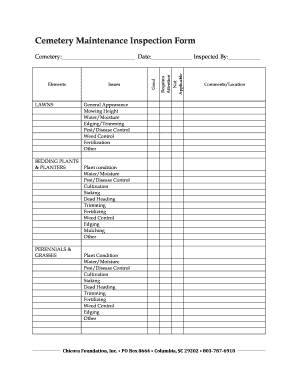
Get Cemetery Maintenance Inspection Form - Chicora Foundation
How it works
-

Open form follow the instructions
-

Easily sign the form with your finger
-

Send filled & signed form or save
How to fill out the Cemetery Maintenance Inspection Form - Chicora Foundation online
Filling out the Cemetery Maintenance Inspection Form online is essential for maintaining the health and aesthetic appeal of cemetery grounds. This guide will provide you with clear and detailed instructions to ensure a smooth completion of the form.
Follow the steps to fill out the Cemetery Maintenance Inspection Form online.
- Click the ‘Get Form’ button to access the Cemetery Maintenance Inspection Form and open it for editing.
- Begin by entering the name of the cemetery, the date of the inspection, and the name of the person conducting the inspection in the designated fields.
- For the Lawns section, evaluate the general appearance, mowing height, water/moisture levels, edging/trimming, pest/disease control, weed control, and fertilization. Check the appropriate boxes to indicate the current condition.
- In the Bedding Plants & Planters, Perennials & Grasses sections, provide details about plant condition, water/moisture, pest/disease control, and other maintenance tasks such as trimming and fertilizing. Use the comments/location field to provide any specific observations.
- Assess the Shrubs & Groundcovers section similarly, focusing on general condition and maintenance needs, marking issues and good conditions as appropriate.
- In the Trees section, evaluate the overall condition and various aspects such as pruning and potential hazards. Fill in the comments/location field with any significant observations.
- For the Irrigation section, check the heads/risers, pressure, coverage, and controller settings. Mark any issues found.
- In the Drains/Ditches section, report on debris and pollution. Note any additional observations.
- In the Furnishings & Fixtures section, indicate any damage or cleanliness issues.
- Review all sections to ensure completeness, then choose to save changes, download, print, or share the form according to your needs.
Complete your Cemetery Maintenance Inspection Form online today for efficient and organized documentation.
There are many methods of coupon or promo code abuse that let fraudsters benefit from promotions in unintended (and, in many cases, illegal) ways. They can steal coupons, create counterfeit coupons, or make copies of legitimate coupons.