Loading
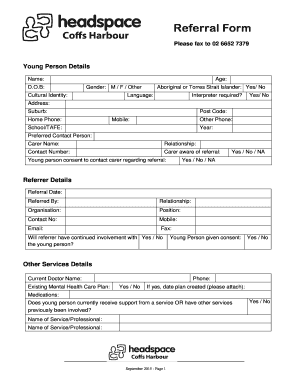
Get Headspace Coffs Harbour Referral Form
How it works
-

Open form follow the instructions
-

Easily sign the form with your finger
-

Send filled & signed form or save
How to fill out the Headspace Coffs Harbour Referral Form online
Completing the Headspace Coffs Harbour Referral Form online is a streamlined process aimed at providing essential support for young individuals. This guide offers detailed instructions for each section of the form to ensure users can fill it out accurately and efficiently.
Follow the steps to complete your referral form online.
- Click ‘Get Form’ button to access the Headspace Coffs Harbour Referral Form and open it for editing.
- Begin with the section for young person details. Provide the name, date of birth, age, and gender of the young person. Ensure accuracy in these responses to avoid any delays in processing the referral.
- Indicate the cultural identity and whether the young person identifies as Aboriginal or Torres Strait Islander. Specify the preferred language and if an interpreter is required.
- Fill in the contact details, including the young person's address, phone numbers, and school/TAFE information. This ensures effective communication throughout the process.
- Identify the preferred contact person and include their relationship to the young person. Confirm that the carer is aware of the referral and that the young person has consented to contact their carer regarding the referral.
- Proceed to the referrer details section. Provide the referral date, referrer's name, relationship to the young person, and organization details. Include contact numbers, email, and fax information for follow-up.
- In the other services details section, indicate the current doctor’s name and whether there is an existing mental health care plan, along with relevant medications. This information is crucial for the intake process.
- Outline the main issues and concerns for which assistance is needed. Offer as much background information as possible to facilitate a comprehensive understanding of the young person's situation.
- Select the professionals at headspace Coffs Harbour the young person should see, including any relevant documents like the Mental Health Treatment Plan or assessment forms, if applicable.
- Upon completing all sections, review the information carefully for accuracy. Once confirmed, you can save changes, download, print, or share the completed form as necessary.
Get started on your referral today and help connect young people with vital services.
Related links form
All eheadspace services are free, but if you call from your mobile your usual call charges apply. To access eheadspace for the first time all you need to do is register or phone 1800 650 890. You will need to provide some information like your email address, postcode and age.