Loading
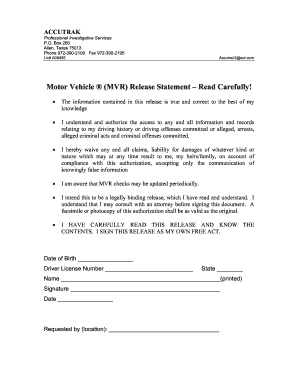
Get Motor Vehicle Mvr Release Statement Read Carefully - Cathdal
How it works
-

Open form follow the instructions
-

Easily sign the form with your finger
-

Send filled & signed form or save
How to fill out the Motor Vehicle MVR Release Statement Read Carefully - Cathdal online
Filling out the Motor Vehicle MVR Release Statement is an important step for allowing access to your driving records. This guide provides you with clear, step-by-step instructions on how to complete the form online effectively.
Follow the steps to accurately complete your form.
- Click 'Get Form' button to obtain the form and open it in your preferred editor.
- Enter your date of birth in the designated field. Ensure that the date is accurate as it is crucial for verifying your identity.
- Provide your driver license number in the appropriate section. This number is essential for the retrieval of your driving history.
- Select your state from the provided options. This is necessary as driving regulations may vary by state.
- Print your name clearly in the space marked for your printed name. This helps in confirming your identity on the document.
- Sign the form in the designated signature section. Your signature indicates your consent and understanding of the information contained within the release statement.
- Enter the date on which you are completing the form. This is essential for documentation purposes.
- Complete the section regarding the location from which the request was made. This can help clarify who is requesting your driving records.
- Review the form for any errors or omissions. Ensure all fields are filled out correctly before finalizing your submission.
- Once you have filled out the form, you can save changes, download, print, or share the completed document as needed.
Start completing your Motor Vehicle MVR Release Statement online today for quick access to your driving records.