Loading
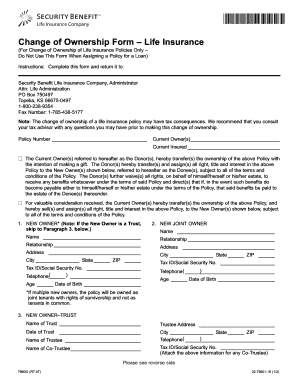
Get 32-79601-15 Change Of Ownershipqxd - Security Benefit
How it works
-

Open form follow the instructions
-

Easily sign the form with your finger
-

Send filled & signed form or save
How to use or fill out the 32-79601-15 Change Of Ownershipqxd - Security Benefit online
This guide provides clear instructions for users on how to fill out the 32-79601-15 Change Of Ownership form for life insurance policies. Whether you are familiar with digital document management or not, this step-by-step approach is designed to assist you in completing the form accurately and online.
Follow the steps to complete the Change Of Ownership form online.
- Press the ‘Get Form’ button to access the 32-79601-15 Change Of Ownership form. This will allow you to open the document for editing online.
- In the first section, enter the policy number associated with the life insurance you are transferring. This number is essential for identifying the correct policy.
- Next, fill in the current owner's name and information, which includes their legal name and contact details. This identifies who is transferring the ownership.
- Indicate the nature of the transfer. Choose whether it is a gift or a sale by checking the appropriate box. This will help clarify the purpose of the ownership change.
- Provide details for the new owner(s). If the new owner is an individual, fill in their name, relationship to the current owner, address, tax ID or social security number, and phone number.
- If there is a joint owner, repeat step 5 and fill out the corresponding information for this person.
- For ownership transfer to a trust, complete the section pertaining to trusts. Enter the trust name, trustee address, date of trust execution, and contact information.
- All current owners, trustees, and new owners must sign in the designated signature areas. Make sure to include the date for validation.
- If applicable, any spouse signatures required for documentation in community property states should be included as specified.
- Once all sections have been filled out, review the form for accuracy and completeness. You can then save changes, download, print, or share the form as needed.
Ensure your life insurance policy reflects the correct ownership by completing the Change Of Ownership form online today.
You can reach Security Benefit by calling 785.438. 3000 or 800.888. 2461, 8 a.m. to 7 p.m. (Eastern Time), Monday through Friday.
Industry-leading security and compliance
US Legal Forms protects your data by complying with industry-specific security standards.
-
In businnes since 199725+ years providing professional legal documents.
-
Accredited businessGuarantees that a business meets BBB accreditation standards in the US and Canada.
-
Secured by BraintreeValidated Level 1 PCI DSS compliant payment gateway that accepts most major credit and debit card brands from across the globe.