Loading
Get Medical Report
How it works
-

Open form follow the instructions
-

Easily sign the form with your finger
-

Send filled & signed form or save
How to fill out the Medical Report online
This guide provides a step-by-step approach to completing the Medical Report online. Whether you are a student preparing for university admission or a physician assisting with the evaluation, this comprehensive guide aims to ensure accurate and complete submissions.
Follow the steps to complete your Medical Report online.
- Press the ‘Get Form’ button to obtain the Medical Report form and open it in the designated online editor.
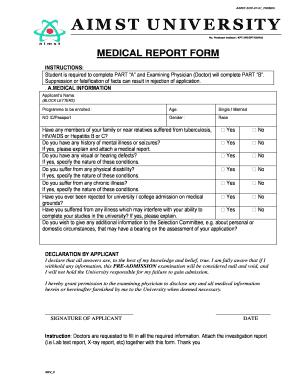
- Complete Part 'A' of the Medical Report. Start by entering your name in block letters, followed by the programme you are enrolling in, your age, marital status, ID or passport number, gender, and race.
- Answer the health-related questions honestly. Indicate whether any family members have suffered from conditions such as tuberculosis, HIV/AIDS, or Hepatitis. Provide explanations where necessary, and attach any relevant medical reports.
- Fill in the details regarding your history of mental illness, visual or hearing defects, physical disabilities, chronic illnesses, and any past university admission rejections due to medical grounds. Be thorough in your explanations to ensure clarity.
- In the declaration section, affirm that all the information provided is true to the best of your knowledge. Confirm your consent for the examining physician to share your medical information with the university as needed.
- After completing Part 'A', save your progress. Ensure that any required investigation reports are attached as per the doctor's instructions.
- Once Part 'A' is completed, submit the form to the examining physician for them to fill out Part 'B'. Ensure they complete all required fields and provide their recommendation regarding your medical fitness for university.
- Review the entire document for accuracy. Finally, download, print, or share the completed Medical Report as instructed.
Complete your Medical Report online today to move forward with your application process.
By email: PRA@dmhc.ca.gov. By mail: Department of Managed Health Care, attn: Office of Legal Services, 980 Ninth Street, Ste. 500, Sacramento, CA 95814. By fax: (916) 322-9430.
Industry-leading security and compliance
US Legal Forms protects your data by complying with industry-specific security standards.
-
In businnes since 199725+ years providing professional legal documents.
-
Accredited businessGuarantees that a business meets BBB accreditation standards in the US and Canada.
-
Secured by BraintreeValidated Level 1 PCI DSS compliant payment gateway that accepts most major credit and debit card brands from across the globe.