Loading
Get Trans Req 64952
How it works
-

Open form follow the instructions
-

Easily sign the form with your finger
-

Send filled & signed form or save
How to fill out the Trans Req 64952 online
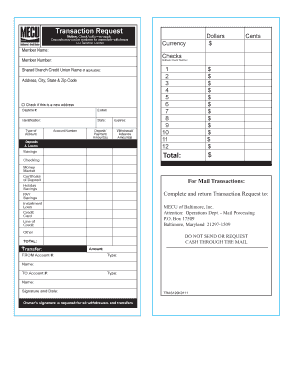
Filling out the Trans Req 64952 form online is a straightforward process designed to assist users with their transaction requests. This guide will walk you through each section of the form, ensuring you have all the information needed to complete it accurately.
Follow the steps to complete your transaction request form
- Use the ‘Get Form’ button to access the online form and open it in your preferred editor.
- Begin by filling in your member name in the designated field. This ensures that the request is processed under your account.
- Enter the currency and amount in dollars and cents as indicated. Specify the details for any checks, including check number if applicable.
- Provide your member number in the specified field to identify your account accurately.
- If you are using a shared branch credit union, fill in its name and address, including the city, state, and zip code.
- Include a daytime phone number and email address for any necessary follow-up communication.
- Indicate the type of account and its associated account number, making sure to select from the provided options like savings or checking.
- Fill in the deposit/payment amount and withdrawal/advance amount as relevant to your transaction.
- List additional deposits or loans in the appropriate fields, ensuring to sum the total accurately.
- For mail transactions, verify the mailing address for submission and check the box if you are providing a new address.
- Provide transfer details including from and to account details along with the amount and type of accounts involved.
- Sign and date the form to authorize the request. Your signature is necessary for processing all withdrawals and transfers.
- Once all fields are filled, you can save changes, download the completed form, print it, or share it as needed.
Complete your transaction request online for convenience and efficiency.
After uploading the PDF file, go to the toolbar on top of the page and click on Edit. Locate the watermark you want to remove and click on it. This will select the watermark. Now, simply press the Delete key on your keyboard, and the watermark will be removed.