Loading
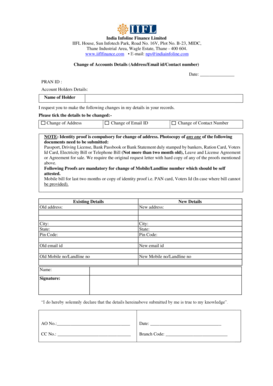
Get Change Of Accounts Details Form - India Infoline Finance Limited
How it works
-

Open form follow the instructions
-

Easily sign the form with your finger
-

Send filled & signed form or save
How to fill out the Change Of Accounts Details Form - India Infoline Finance Limited online
Filling out the Change Of Accounts Details Form for India Infoline Finance Limited is a straightforward process that allows users to update their personal information such as address, email ID, and contact number. This guide provides clear instructions to ensure users can complete the form correctly and efficiently.
Follow the steps to fill out the form accurately.
- Press the ‘Get Form’ button to obtain the form and open it in your editor.
- Begin by entering the current date at the top of the form, followed by your PRAN ID, which is essential for identification.
- In the 'Account Holders Details' section, provide your full name as the holder. Ensure it matches your identification documents.
- Indicate the changes you wish to make by ticking the appropriate box for 'Change of Address', 'Change of Email ID', or 'Change of Contact Number'.
- For a change of address, submit an identity proof along with the form. Attach a photocopy of one of the accepted documents, such as a passport, driving license, or recent utility bill.
- Fill in the existing and new address fields. Include the city, state, and pin code for both your old and new addresses.
- If you are changing your email ID, provide your old email address and the new one in the designated fields.
- For a change of mobile or landline number, enter your current number and the new number. Remember that self-attestation is required for the proof of your new contact number.
- Sign and date the form at the bottom where indicated. Your signature confirms that the information you have provided is true to your knowledge.
- Finally, review the entire form for accuracy. You can then choose to save the changes, download a copy, print the form, or share it as required.
Complete your Change Of Accounts Details Form online today and ensure your information is up to date.
To change the email ID or mobile number linked to your Trading & Demat account: 2) Click on 'Service Request' 3) Click on 'Change your Mobile Number' or 'Change your Email' 4) Enter the desired mobile number or email ID & click on the 'Verify' button. 5) Enter the OTP sent to your newly entered mobile number/ Email ID.
Industry-leading security and compliance
US Legal Forms protects your data by complying with industry-specific security standards.
-
In businnes since 199725+ years providing professional legal documents.
-
Accredited businessGuarantees that a business meets BBB accreditation standards in the US and Canada.
-
Secured by BraintreeValidated Level 1 PCI DSS compliant payment gateway that accepts most major credit and debit card brands from across the globe.