Loading
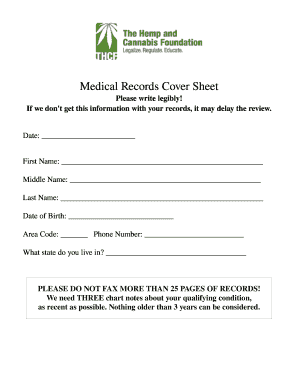
Get Medical Records Cover Sheet
How it works
-

Open form follow the instructions
-

Easily sign the form with your finger
-

Send filled & signed form or save
How to fill out the Medical Records Cover Sheet online
Filling out the Medical Records Cover Sheet online is a crucial step in ensuring your medical records are processed efficiently. This guide will walk you through each section of the form to help you provide all necessary information accurately.
Follow the steps to complete the Medical Records Cover Sheet
- Click ‘Get Form’ button to obtain the form and open it in the editor.
- In the date field, enter the current date. This ensures that your submission is timely and relevant.
- Fill in your first name in the designated field. Be sure to type it legibly for clarity.
- Next, enter your middle name, if applicable. If you do not have a middle name, you may leave this field blank.
- In the last name section, provide your surname. Again, ensure it is entered clearly.
- Fill in your date of birth in the specified field. This helps in identifying your records accurately.
- Enter your area code and phone number in the appropriate fields. This allows the reviewing party to contact you if needed.
- Indicate the state you reside in by typing it in the provided field. This information is relevant to your medical record review.
- Review all entered information for accuracy. Confirm that it matches your identification documents.
- Once you have completed filling out the form, you can save your changes, download, print, or share the form as needed.
Complete your Medical Records Cover Sheet online today for a smooth processing experience.
First of all, do not use the patient's name or other PHI in the subject line on the fax cover sheet. I recommend listing a contact person and their phone number; it displays more of a sense of urgency if the incorrect fax is received.