Loading
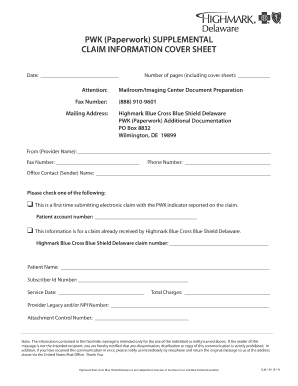
Get Pwk Fax Cover Sheet - Highmark
How it works
-

Open form follow the instructions
-

Easily sign the form with your finger
-

Send filled & signed form or save
How to fill out the PWK Fax Cover Sheet - Highmark online
Filling out the PWK Fax Cover Sheet for Highmark can be a straightforward process with the right guidance. This guide will provide step-by-step instructions to help you complete the form accurately and efficiently.
Follow the steps to complete your PWK Fax Cover Sheet effectively.
- Click the ‘Get Form’ button to access the PWK Fax Cover Sheet and open it in the online editor.
- Fill in the 'Date' section with the current date to indicate when you are submitting the form.
- Direct your attention to the 'Attention' and 'Fax Number' fields. Enter the appropriate recipient's name and their corresponding fax number.
- In the 'Mailing Address' section, provide the appropriate mailing address for the intended recipient of the fax cover sheet.
- Specify the 'Number of pages' you are sending, including the cover sheet.
- For the sender's information, complete the 'From (Provider Name)' field with the name of the person or organization sending the fax.
- Fill out the 'Fax Number' and 'Phone Number' fields to provide contact information for the sender.
- Enter the 'Office Contact (Sender) Name' to specify who can be contacted regarding this fax.
- Indicate whether this is a first-time electronic claim submission or for a claim already received by Highmark. Select the appropriate checkbox and fill in the related patient account number or claim number as required.
- Provide the 'Patient Name' and 'Subscriber Id Number' in the designated fields to identify the patient associated with the claim.
- Enter the 'Service Date' and 'Total Charges' to detail the service provided and the charges incurred.
- Complete the 'Provider Legacy and/or NPI Number' and fill in the 'Attachment Control Number' if applicable.
- Review all the information entered, ensuring accuracy and completeness.
- Once the form is completed, you can save changes, download a copy, print the document, or share it as needed.
Complete your PWK Fax Cover Sheet online today to ensure swift processing of your claims.
Providers in need of assistance should contact provider services at 800-241-5704 (toll-free).