Loading
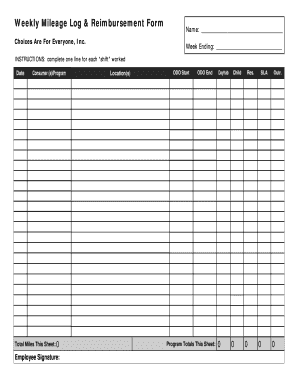
Get Timesheet Mileage Side - Choices Are For Everyone - Cafeinc
How it works
-

Open form follow the instructions
-

Easily sign the form with your finger
-

Send filled & signed form or save
How to fill out the Timesheet Mileage Side - Choices Are For Everyone - Cafeinc online
This guide provides a clear and supportive approach to filling out the Timesheet Mileage Side - Choices Are For Everyone - Cafeinc form online. By following these steps, users can efficiently document their mileage for reimbursement.
Follow the steps to complete your form accurately.
- Click the ‘Get Form’ button to obtain the form and open it in the designated editor.
- Begin by entering your name in the designated field at the top of the form. This personal information is crucial for identification.
- Locate the 'Week Ending' section and input the date that corresponds to the end of the week for which you are logging mileage.
- For each shift worked, fill out a line with the following information: the date of the shift, the consumer(s) or program involved, and the total miles for that specific shift.
- In the 'ODO Start' (odometer start) and 'ODO End' (odometer end) fields, document the starting and ending odometer readings for the vehicle used during each shift.
- Calculate the total miles for this sheet and enter that number in the 'Total Miles This Sheet' field, ensuring accuracy in your calculations.
- Review the program totals for Dayhab, Child, Res., SLA, and Outr. Against your shifts to ensure all relevant miles are accounted for.
- Finally, sign the form in the 'Employee Signature' section to verify that the information provided is correct.
- Once all sections are filled out, save your changes, download, print, or share the completed form according to your needs.
Start filling out your form online today to ensure timely reimbursement for your mileage!
Transaction date is the actual date when the trade was initiated. On the other hand, settlement date is the final date when the transaction is completed. That is, the date when the ownership of the security is transferred from the seller to the buyer, and the buyer makes the payment for the security to the seller.
Industry-leading security and compliance
US Legal Forms protects your data by complying with industry-specific security standards.
-
In businnes since 199725+ years providing professional legal documents.
-
Accredited businessGuarantees that a business meets BBB accreditation standards in the US and Canada.
-
Secured by BraintreeValidated Level 1 PCI DSS compliant payment gateway that accepts most major credit and debit card brands from across the globe.