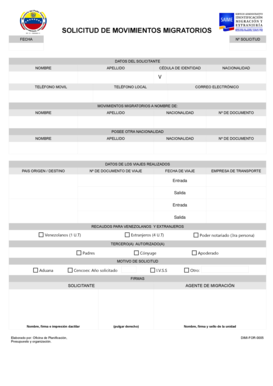
SOLICITUD DE MOVIMIENTOS MIGRATORIOS FECHA N SOLICITUD DATOS DEL SOLICITANTE NOMBRE APELLIDO CDULA DE IDENTIDAD NACIONALIDAD V TELFONO MOVIL TELFONO LOCAL CORREO ELECTRNICO MOVIMIENTOS MIGRATORIOS.
Open form follow the instructions
Easily sign the form with your finger
Send filled & signed form or save
How to fill out the SOLICITUD DE MOVIMIENTOS MIGRATORIOS - Saime Gob online
The SOLICITUD DE MOVIMIENTOS MIGRATORIOS is a crucial document for individuals seeking to manage their migratory movements. This guide offers clear, step-by-step instructions to help you complete the form accurately and efficiently.
Follow the steps to successfully fill out the form.
- Click the ‘Get Form’ button to access the document and open it in your editing tool.
- In the ‘Fecha’ field, input the current date of your application submission.
- Enter the 'Nº Solicitud', which is your unique application number, if applicable.
- Fill in the 'Datos del Solicitante' section: Provide your first name ('Nombre'), last name ('Apellido'), identification number ('Cédula de Identidad'), nationality ('Nacionalidad'), mobile phone number ('Teléfono Móvil'), local phone number ('Teléfono Local'), and email address ('Correo Electrónico').
- Complete the 'Movimientos Migratorios a Nombre de' section with the relevant information of the individual for whom the migratory movements are being requested: their first name, last name, nationality, document number, and if they hold another nationality.
- Indicate the country of origin/destination in the specified field and provide the travel document number ('Nº de Documento de Viaje').
- In the section labeled 'Datos de los Viajes Realizados', fill in travel details including travel date ('Fecha de Viaje'), transportation company ('Empresa de Transporte'), and specify entries and exits.
- Under 'Recaudos para Venezolanos y Extranjeros', select the appropriate indication based on your status. Provide any further supporting documents as needed.
- Identify any authorized third parties if applicable, by entering their names and relationships.
- State the reason for your application in the 'Motivo de Solicitud' section, including relevant agencies or reasons if applicable.
- Finally, complete the signature section by providing your name, signature, and thumbprint as required. Ensure the migration agent also fills in their necessary information.
- After completing the form, you may save your changes, download, print, or share the document as needed.
Complete your online documents confidently and ensure your migratory movements are handled smoothly.
Experience a faster way to fill out and sign forms on the web. Access the most extensive library of templates available.
Related content
Dec 11, 2019 — ... estos movimientos de personas son impulsados por organizaciones...
Sep 23, 2015 — Los movimientos migratorios en las fronteras iberoamericanas. ... Perú y...
Get answers to your most pressing questions about US Legal Forms API.
¿Cómo cerrar un trámite de cedula en el Saime?
Ingresar al portal web del Saime www.Saime.gob.ve. ... Iniciar sesión con el número de cédula y contraseña actual. Seleccionar la opción «Cedulación», «Cierre de Trámite» y luego «Cierre de Trámite de Cedulación». Elegir el trámite. ... Cerrar trámite.
¿Cómo sacar los movimientos migratorios en Venezuela?
Planilla de solicitud. Comprobante de Pago del Tributo correspondiente al trámite. Si el trámite es realizado por un intermediario, debe presentar una autorización notariada y/o poder del otorgante, acta de nacimiento o matrimonio donde se demuestre la consanguinidad con el solicitante. Copia del Pasaporte Extranjero.
¿Cómo solicitar movimiento migratorio en Venezuela?
Planilla de solicitud. Comprobante de Pago del Tributo correspondiente al trámite. Si el trámite es realizado por un intermediario, debe presentar una autorización notariada y/o poder del otorgante, acta de nacimiento o matrimonio donde se demuestre la consanguinidad con el solicitante. Copia del Pasaporte Extranjero.
¿Cómo solicitar los movimientos migratorios?
Se debe presentar documentos originales cédula de ciudadanÃa y/o pasaporte /D.I. Cancelar el valor de $5 por cada movimiento migratorio, en las oficinas del Banco del PacÃfico con el código de pago 4.1 (CERTIFICADO MIGRATORIO).
¿Cómo saber estado migratorio de una persona?
Acude a la página en español de USCIS. Haz clic en Verifique el estatus de su caso. Coloca el número de recibo en el recuadro indicado. Haz clic en Verifique Estatus.
¿Cómo cerrar trámite de cedula Saime?
Ingresar al portal web del Saime www.Saime.gob.ve. ... Iniciar sesión con el número de cédula y contraseña actual. Seleccionar la opción «Cedulación», «Cierre de Trámite» y luego «Cierre de Trámite de Cedulación». Elegir el trámite. ... Cerrar trámite.
¿Cómo se solicita movimiento migratorio?
Formulario F-003 (gratuito). Podrá descargarlo aquÃ. Recibo de pago del Banco de la Nación por derecho de trámite. (S/. ... Exhibición del original y copia fotostática simple y legible del documento de identidad vigente del solicitante: cédula de identidad, pasaporte, DNI.
¿Cómo obtener certificado de movimiento migratorio Colombia?
Cédula de ciudadanÃa o Pasaporte en caso de ser extranjero, del titular de los movimientos migratorios. Registrar un correo electrónico válido. Diligenciar el Formulario Ãnico de Trámites a través de la página web de Migración Colombia. Validar la identificación personal.
¿Cómo cerrar un trámite de cedula?
Ingresa en la página del Saime. ... Selecciona Cierre de trámite (Introduce en este campo tu número de cédula y clave para obtener tu acceso a la nueva dirección) Selecciona el tipo de trámite a finalizar tras haber ingresado los datos del documento. Actualiza el estatus del pasaporte o prórroga.
¿Qué es cierre de trámite Saime?
El Servicio Administrativo de Identificación, Migración y ExtranjerÃa (Saime), ofrece a sus usuarios la opción para el Cierre de Trámite de Cedulación , siendo una nueva modalidad que brinda el portal web para que la persona finalice su trámite de cedulación desde la comodidad de un dispositivo móvil, sin tener que ...
Use professional pre-built templates to fill in and sign documents online faster. Get access to thousands of forms.
If you believe that this page should be taken down, please follow our DMCA take down process here.