Loading
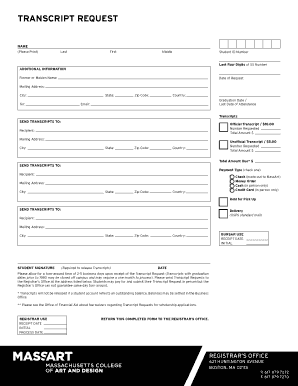
Get Download A Transcript Request Form - Inside Massart - Inside Massart
How it works
-

Open form follow the instructions
-

Easily sign the form with your finger
-

Send filled & signed form or save
How to fill out the Download A Transcript Request Form - Inside MassArt online
This guide provides a detailed walkthrough of the Download A Transcript Request Form for users of the Inside MassArt platform. Follow these instructions to ensure you complete the form accurately and efficiently.
Follow the steps to successfully complete the transcript request form online.
- Press the ‘Get Form’ button to access the transcript request form and open it in the editor.
- Begin by filling out the 'Name' section. Include your last name, first name, and middle name as requested.
- Enter your Student ID Number and the last four digits of your Social Security number for identification purposes.
- Complete the 'Additional Information' section by providing any former or maiden names, the date of your request, and your complete mailing address including city, state, zip code, and country.
- Indicate your graduation date or last date of attendance and provide your email address for communication.
- In the 'Transcripts' section, choose between requesting an official or unofficial transcript. Specify the number of copies requested and the total amount due.
- Fill out the 'Send Transcripts To' section by providing the recipient's name and complete mailing address.
- Select your payment type by checking the appropriate box. Options include check, money order, cash (in person only), or credit card (in person only). You may also choose to hold for pick-up.
- Sign the form in the 'Student Signature' section to authorize the release of your transcripts.
- After completing the form, review all the information for accuracy. You can then save your changes, download, print, or share the form as needed.
Complete your transcript request form online today for a smooth and efficient processing experience.
Otherwise, the recommender can email or mail the letter to Office of Admissions (gradadmissions@massart.edu or 621 Huntington Ave, Boston, MA 02115).