Loading
Get Graduation Plan
How it works
-

Open form follow the instructions
-

Easily sign the form with your finger
-

Send filled & signed form or save
How to fill out the Graduation Plan online
This guide provides comprehensive instructions on how to complete the Graduation Plan online. Whether you are a student or a parent, follow these steps to ensure that all necessary information is accurately filled out.
Follow the steps to successfully complete the Graduation Plan.
- Press the ‘Get Form’ button to access the form and open it in your preferred editing tool.
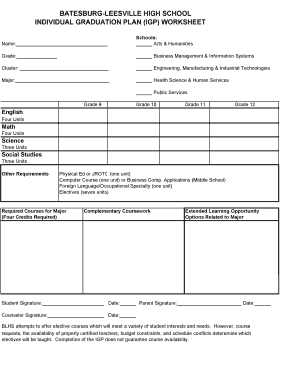
- Begin by filling in your name in the designated area at the top of the form. This personal identification is essential for processing your Graduation Plan.
- In the 'Schools' section, select the programs of interest by checking the appropriate boxes such as Arts & Humanities, Business Management & Information Systems, Engineering, Manufacturing & Industrial Technologies, Health Science & Human Services, or Public Services.
- Indicate your current grade level by writing the grade number in the provided space. Use a clear and legible format.
- Next, fill in your chosen cluster by writing this information in the designated field. This section helps in tailoring your educational path.
- Complete the 'Major' field with the specific course of study you intend to focus on. This is critical as it influences the required coursework.
- Under the section labeled 'Required Courses for Major', ensure to list any courses relevant to your major, paying attention to the four-credit requirement.
- In the 'Other Requirements' section, review and document your need for courses such as Physical Education or JROTC, foreign language, a computer course, and electives. Make sure to total seven elective units.
- Once all fields are filled in, you will need to sign the form along with your parent or guardian. Ensure that both signatures are dated for accuracy.
- Finally, save your changes, and choose to download, print, or share the completed Graduation Plan as needed.
Start completing your Graduation Plan online today!
9th grade - 60 credits. 10th grade - 120 credits. 11th grade - 180 credits. 12th grade - 225 credits.
Industry-leading security and compliance
US Legal Forms protects your data by complying with industry-specific security standards.
-
In businnes since 199725+ years providing professional legal documents.
-
Accredited businessGuarantees that a business meets BBB accreditation standards in the US and Canada.
-
Secured by BraintreeValidated Level 1 PCI DSS compliant payment gateway that accepts most major credit and debit card brands from across the globe.