Loading
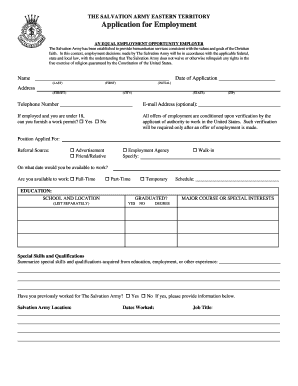
Get Application For Employment - The Salvation Army Usa: Eastern ... - Use Salvationarmy
How it works
-

Open form follow the instructions
-

Easily sign the form with your finger
-

Send filled & signed form or save
How to use or fill out the Application For Employment - The Salvation Army USA: Eastern ... - Use Salvationarmy online
Filling out the application for employment at The Salvation Army is a straightforward process that allows you to showcase your skills and experiences. This guide provides step-by-step instructions to help you complete the application effectively and efficiently.
Follow the steps to fill out your application confidently.
- Press the ‘Get Form’ button to obtain the application form and open it in your preferred document editor.
- Begin by entering your name in the format of last name first, followed by your first name and initials.
- Fill in the date of the application in the designated space.
- Provide your address, including street, city, state, and zip code, ensuring that all details are accurate.
- Enter your telephone number and an optional email address.
- If you are under 18, indicate whether you can furnish a work permit by selecting 'Yes' or 'No'.
- Specify the position you are applying for and the source through which you learned about the job, such as advertisement or friend.
- Indicate your availability to work, specifying full-time, part-time, or temporary, and include your desired schedule.
- List your educational background by providing the school name, location, graduation status, major course or interests, and degree.
- Summarize any special skills and qualifications that you have gained from education or other experiences.
- If applicable, indicate prior employment with The Salvation Army, including location, dates worked, and job title.
- Detail your work history, starting with the most recent employer. Include the name of the company, dates of employment, starting and last salary, job title, and reason for leaving.
- Provide information for business references, ensuring that you include their relationship to you and other required details.
- Read the acknowledgment section carefully, certify that your answers are true, and provide your signature along with the date.
- Review the completed application for any errors or missing information before finalizing.
- Once finalized, you can save changes, download, print, or share the completed application form.
Start completing your application online today and take the first step towards joining The Salvation Army!
The Salvation ArmyCongregations15,409Members1.65 millionMinisters26,359Other name(s)East London Christian Mission (formerly)13 more rows
Industry-leading security and compliance
US Legal Forms protects your data by complying with industry-specific security standards.
-
In businnes since 199725+ years providing professional legal documents.
-
Accredited businessGuarantees that a business meets BBB accreditation standards in the US and Canada.
-
Secured by BraintreeValidated Level 1 PCI DSS compliant payment gateway that accepts most major credit and debit card brands from across the globe.