Loading
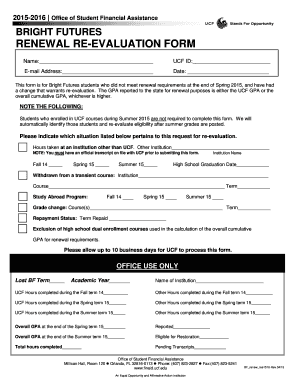
Get Renewal Re-evaluation Form - Ucf Student Financial Assistance - Finaid Ucf
How it works
-

Open form follow the instructions
-

Easily sign the form with your finger
-

Send filled & signed form or save
How to fill out the Renewal Re-evaluation Form - UCF Student Financial Assistance - Finaid Ucf online
Completing the Renewal Re-evaluation Form is essential for Bright Futures students seeking a re-evaluation of their financial assistance eligibility due to recent changes. This guide will provide you with clear and concise instructions to navigate the form effectively.
Follow the steps to accurately complete the Renewal Re-evaluation Form.
- Click ‘Get Form’ button to obtain the form and open it in your document editor.
- Begin by filling in your personal information in the designated fields. Enter your name, UCF ID, email address, and the current date. Ensure that your UCF ID is accurate to facilitate processing.
- Indicate the situation that applies to your request for re-evaluation by selecting the corresponding option. You will need to provide additional specifics, such as the name of the institution if you took hours elsewhere.
- For situations such as withdrawals from courses, submit the details including the institution, course name, and term. Provide this information clearly to avoid any confusion.
- If applicable, include information about study abroad programs or any grade changes. Specify the courses and the term for accurate assessment.
- For those with repayment statuses, ensure that the term repaid is filled out correctly to reflect your history.
- If you wish to exclude high school dual enrollment courses from your overall cumulative GPA calculation, indicate the relevant terms.
- Review your completed form thoroughly to confirm that all information is accurate and complete.
- Once you have filled out all sections, save your changes. You may choose to download, print, or share the completed form for submission.
Complete your Renewal Re-evaluation Form online to ensure your continued eligibility for Bright Futures financial assistance.
You also have the option of scheduling an appointment with a financial aid counselor by calling 407-823-5285. The main customer service phone number is (844) 376-9160 or email finaid@ucf.edu.
Industry-leading security and compliance
US Legal Forms protects your data by complying with industry-specific security standards.
-
In businnes since 199725+ years providing professional legal documents.
-
Accredited businessGuarantees that a business meets BBB accreditation standards in the US and Canada.
-
Secured by BraintreeValidated Level 1 PCI DSS compliant payment gateway that accepts most major credit and debit card brands from across the globe.