Loading
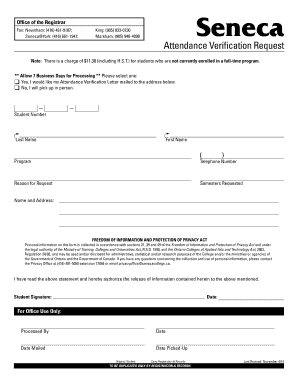
Get Seneca Verification Of Enrollment
How it works
-

Open form follow the instructions
-

Easily sign the form with your finger
-

Send filled & signed form or save
How to fill out the Seneca Verification Of Enrollment online
This guide provides clear instructions for users on how to accurately complete the Seneca Verification Of Enrollment form online. By following these steps, users can ensure that their enrollment verification requests are processed efficiently and correctly.
Follow the steps to complete your Seneca Verification Of Enrollment form online:
- Press the ‘Get Form’ button to obtain the form and open it in the designated editing interface.
- Begin by entering your student number in the corresponding field. This unique identifier is essential for processing your request.
- Next, fill in your last name and first name in the provided fields. Ensure that the spelling is correct to avoid any processing delays.
- In the program section, specify the program you are currently enrolled in. This information is necessary for the verification process.
- Enter a valid telephone number where you can be contacted if there are any issues with your request.
- Select a reason for your attendance verification request from the available options. This helps in the administrative processing of your request.
- Indicate the semesters for which you are requesting verification. Be specific to ensure that you receive the correct information.
- Provide your name and mailing address if you wish to have your Attendance Verification Letter mailed. Alternatively, select the option to indicate that you will pick it up in person.
- Read the statement regarding the Freedom of Information and Protection of Privacy Act to understand how your personal information will be handled.
- Sign and date the form to authorize the release of the information contained within it.
- Finally, review all the entered information for accuracy. Once confirmed, you can save any changes, and consider downloading, printing, or sharing the form as needed.
Complete your Seneca Verification Of Enrollment online today for accurate processing.
You can use Self Service Password Recovery if you previously set it up with a recovery method. Go to MyID – myid.senecacollege.ca. Select Reset Password. Enter your Seneca email address and the characters in the picture. On clicking Next, select your verification option, for this example Email my alternate email is chosen.