Loading
Get Seneca Transcript
How it works
-

Open form follow the instructions
-

Easily sign the form with your finger
-

Send filled & signed form or save
How to fill out the Seneca Transcript online
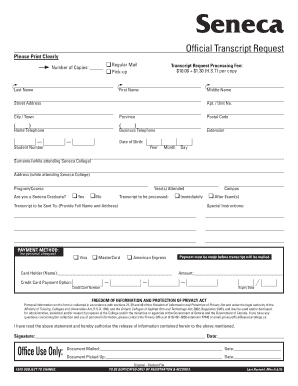
Filling out the Seneca Transcript is a crucial step in obtaining your academic records. This guide provides clear and detailed instructions to help you navigate the online process efficiently.
Follow the steps to complete your Seneca Transcript request online.
- Use the ‘Get Form’ button to access the Seneca Transcript request form. This will allow you to open the document in an online editor.
- Begin filling out your personal information. Clearly enter your last name, first name, and middle name as it appears on official documents.
- Provide your complete mailing address, including street address, apartment or unit number, city or town, province, and postal code.
- Enter your contact information: home telephone, business telephone, and if applicable, extension.
- Indicate your date of birth using the format: Year, Month, Day.
- Include your student number, the surname you used while attending Seneca College, and your address during your time at the college.
- List the program or course you attended, the years you were enrolled, and the campus location.
- Select whether you are a Seneca graduate by choosing 'Yes' or 'No'.
- Choose the processing time for your transcript: either 'Immediately' or 'After Exam(s)'.
- Provide the full name and address of where the transcript should be sent.
- If you have any special instructions for processing your request, include them in the designated area.
- Select your payment method, either Visa, MasterCard, or American Express. Note that personal checks are not accepted.
- Enter the name of the cardholder and the amount you are paying for the transcript processing.
- Complete the credit card payment details: credit card number and expiry date.
- Read and acknowledge the Freedom of Information and Protection of Privacy Act statement by signing and dating the form.
- Review all the information provided to ensure accuracy before submitting your request.
- After filling out the form, save any changes made, download a copy for your records, or print and share if needed.
Start your transcript request today by completing the Seneca Transcript online.
Unofficial Transcripts An unofficial transcript is a list of completed courses and grades from Seneca. Unofficial transcripts can be viewed and obtained by selecting the Academic Records tile in Student Home. There is no fee for unofficial transcripts.