Loading
Get Notice Of Intent To Dissolve - Minnesota Attorney General
How it works
-

Open form follow the instructions
-

Easily sign the form with your finger
-

Send filled & signed form or save
How to fill out the Notice Of Intent To Dissolve - Minnesota Attorney General online
Filling out the Notice Of Intent To Dissolve form is essential for organizations looking to formally dissolve in the state of Minnesota. This guide will provide you with clear and concise steps to complete the form online, ensuring you provide all necessary information accurately and efficiently.
Follow the steps to successfully complete the form online.
- To begin, click the ‘Get Form’ button to obtain the form and open it in the editor.
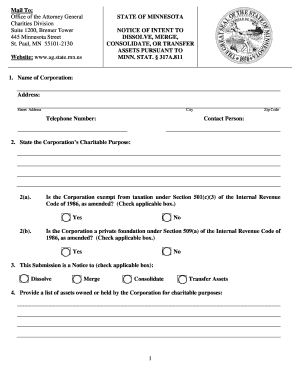
- In the first section, enter the name of your corporation and its address including street, city, and zip code. Include a telephone number and the name of a contact person.
- Next, state your corporation’s charitable purpose clearly.
- Indicate whether your corporation is exempt from taxation under Section 501(c)(3) of the Internal Revenue Code by checking the appropriate box.
- Determine if your corporation is a private foundation under Section 509(a) of the Internal Revenue Code and check the relevant box.
- In the following section, specify the nature of this submission by checking one of the options: dissolve, merge, consolidate, or transfer assets.
- Provide a comprehensive list of assets owned or held by your corporation for charitable purposes.
- List any restricted assets and the purposes for which they were received, or simply state 'none' if there are no restricted assets.
- Describe the debts, obligations, and liabilities your corporation currently holds.
- Outline any tangible assets being converted to cash, and describe how these assets will be sold, or state 'none' if applicable.
- Detail the anticipated expenses related to the dissolution, including any attorney fees.
- List the recipients to whom assets will be transferred, clarifying whether they are tax-exempt under Section 501(c)(3), and if unknown, state 'unknown'.
- Describe the purposes of each recipient of the assets, providing relevant details or stating 'unknown' if the recipients are not confirmed.
- State any terms, conditions, or restrictions that will be placed on each transferred asset.
- Before submission, ensure to complete the affirmation section with the name of the authorized person, sign the document, and provide the date.
- Finally, have the document notarized, then review your form for accuracy. Once confirmed, save your changes, download, print, or share the completed form as necessary.
Complete your documents online today to ensure a smooth dissolution process.
How do I close a business? To close your business and all of your tax accounts through e-Services, you must be an e-Services Master for the business. You can also email business.registration@state.mn.us, or call 651-282-5225 or 1-800-657-3605 (toll-free). Note: If your business closed more than a year ago, contact us.
Industry-leading security and compliance
US Legal Forms protects your data by complying with industry-specific security standards.
-
In businnes since 199725+ years providing professional legal documents.
-
Accredited businessGuarantees that a business meets BBB accreditation standards in the US and Canada.
-
Secured by BraintreeValidated Level 1 PCI DSS compliant payment gateway that accepts most major credit and debit card brands from across the globe.