Loading
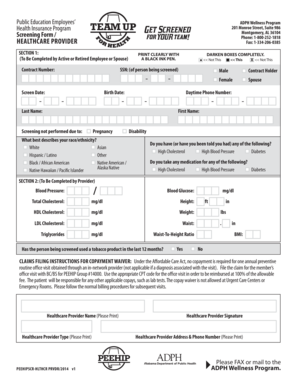
Get 8557 Rsa Peehip Screen Form Rev2.indd - Shelbyed K12 Al
How it works
-

Open form follow the instructions
-

Easily sign the form with your finger
-

Send filled & signed form or save
How to use or fill out the 8557 RSA PEEHIP Screen Form REV2.indd - Shelbyed K12 Al online
Filling out the 8557 RSA PEEHIP Screen Form REV2.indd is an essential step for active or retired employees looking to participate in the Public Education Employees’ Health Insurance Program. This guide provides clear and supportive instructions to help you successfully complete the form online.
Follow the steps to effectively complete the form.
- Click the ‘Get Form’ button to access the form and open it in your preferred editor.
- Fill in your contract number at the top of the form. Ensure that all information is printed clearly using a black ink pen.
- Enter the social security number (SSN) of the person being screened, followed by the screening date.
- Complete the birth date section by entering the day, month, and year of birth.
- Indicate the gender of the contract holder or spouse by darkening the appropriate box completely.
- Provide a daytime phone number for contact purposes.
- Fill in the last name and first name of the person being screened.
- If applicable, select the reason for not performing the screening by darkening the relevant box.
- Choose the option that best describes your race or ethnicity by darkening the corresponding box.
- Indicate if there is any history of high cholesterol, high blood pressure, or diabetes by checking the appropriate boxes.
- Answer whether any medications are being taken for the listed health conditions.
- Section 2 should be filled out by the healthcare provider, including vital statistics like blood pressure, blood glucose, weight, and height.
- The healthcare provider should also indicate whether the person being screened has used tobacco products in the last 12 months.
- Once all sections are completed, the healthcare provider must sign and fill in their name, type, address, and phone number.
- Finally, you can save changes, download, print the form, or share it as required. Ensure that it is sent via fax or mail to the ADPH Wellness Program.
Take action now and complete your forms online to ensure timely submission and processing.
Industry-leading security and compliance
US Legal Forms protects your data by complying with industry-specific security standards.
-
In businnes since 199725+ years providing professional legal documents.
-
Accredited businessGuarantees that a business meets BBB accreditation standards in the US and Canada.
-
Secured by BraintreeValidated Level 1 PCI DSS compliant payment gateway that accepts most major credit and debit card brands from across the globe.