Loading
Get Evidence Log
How it works
-

Open form follow the instructions
-

Easily sign the form with your finger
-

Send filled & signed form or save
How to fill out the Evidence Log online
The Evidence Log is a critical document used for recording and tracking complaints in a systematic manner. This guide provides clear, step-by-step instructions to help users fill out the Evidence Log online effectively.
Follow the steps to complete the Evidence Log online.
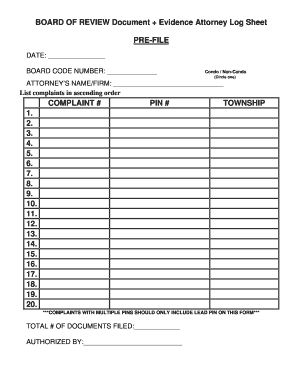
- Press the ‘Get Form’ button to access the Evidence Log and open it in your preferred online editor.
- Enter the pre-file date in the designated field to indicate when the document is being completed.
- Fill in the board code number, ensuring it is accurate for proper identification.
- Indicate whether the case involves a condo or non-condo by circling the appropriate option.
- Provide the attorney’s name or firm name in the specified area.
- List each complaint in ascending order, entering the complaint number and corresponding PIN in the respective fields.
- Include all relevant townships for each complaint, ensuring the information is correct.
- Note that for complaints with multiple PINs, only the lead PIN should be included on this form.
- Complete the total number of documents filed by entering the accurate count.
- Signatory authorization should be completed in the authorized by section to validate the document.
- Review all entered information for accuracy.
- Once satisfied, proceed to save changes, download the completed document, print it for hard copies, or share it as necessary.
Complete your documents online for a streamlined filing process.
How do you prepare a evidence log? The tag should include a police identification number, the date, time, and a description of the item. It should also note where the piece of evidence was collected from, who collected it, and any information associated with the item's make, model, or brand.