Loading
Get Request For Transcript - Cherokee County Government
How it works
-

Open form follow the instructions
-

Easily sign the form with your finger
-

Send filled & signed form or save
How to fill out the Request For Transcript - Cherokee County Government online
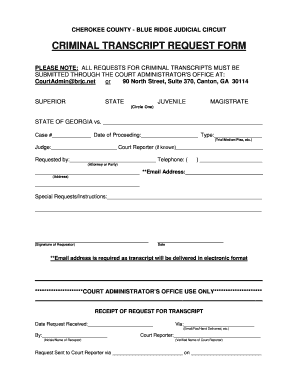
Filling out the Request For Transcript for the Cherokee County Government is an essential step for accessing important legal documentation. This guide provides a clear and user-friendly approach to completing the form efficiently and accurately.
Follow the steps to successfully complete your transcript request online.
- Click ‘Get Form’ button to obtain the Request For Transcript form and open it in your preferred digital format.
- Identify the type of transcript needed by circling one of the options: Superior, State, Juvenile, or Magistrate.
- In the section labeled 'State of Georgia vs.', enter the name of the defendant or party involved in the case.
- Fill in the case number in the designated field, ensuring accuracy to facilitate effective processing.
- Record the date of the proceeding for which the transcript is requested, which could be a trial, motion, or plea.
- Provide the name of the judge presiding over the case, if known, to assist in the retrieval of the correct transcript.
- If applicable, include the name of the court reporter who recorded the proceedings.
- In the 'Requested by' section, indicate whether you are the attorney or the party involved in the case, along with your name and contact telephone number.
- Enter your email address, as this is required for the electronic delivery of the transcript.
- Complete your mailing address in the provided fields, ensuring that all information is accurate.
- If you have any special requests or instructions, outline them clearly in the designated field.
- Sign the form where indicated and include the date of your request.
- Once all fields are completed, review your information for accuracy, then save, download, print, or share the form as necessary.
Complete your Request For Transcript online today for timely access to your legal documents.
All requests for public records are to be directed to Michele Holmes, at public.records@indianriverschools.org in the Office of Finance, located at 6500 57th Street, Vero Beach, FL 32967, 772-564-3103. You may complete this online form, email your request, drop off your request in person, or mail it to SDIRC.
Industry-leading security and compliance
US Legal Forms protects your data by complying with industry-specific security standards.
-
In businnes since 199725+ years providing professional legal documents.
-
Accredited businessGuarantees that a business meets BBB accreditation standards in the US and Canada.
-
Secured by BraintreeValidated Level 1 PCI DSS compliant payment gateway that accepts most major credit and debit card brands from across the globe.