Loading
Get Public Access Option Form - City Of Dallas
How it works
-

Open form follow the instructions
-

Easily sign the form with your finger
-

Send filled & signed form or save
How to fill out the Public Access Option Form - City Of Dallas online
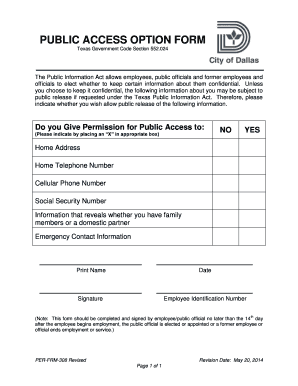
The Public Access Option Form is a critical document for employees and public officials in the City of Dallas, allowing individuals to choose the confidentiality of their personal information. This guide will walk you through the process of completing the form online, ensuring you understand each component.
Follow the steps to successfully complete the Public Access Option Form
- Click ‘Get Form’ button to obtain the form and open it for completion.
- Begin by reviewing the introduction section of the form, which outlines the purpose of the document and your rights under the Texas Public Information Act. Understand the implications of your choices regarding public access to your personal data.
- In the first section, you will find questions regarding your permission for public access to your home address, home telephone number, cellular phone number, social security number, information about family members, and emergency contact details. Indicate your preferences by placing an 'X' in the designated box for either 'YES' or 'NO'.
- Next, proceed to the email address section where you must state your permission for public access to your email addresses. Similar to the previous section, indicate your choice again by marking an 'X' in the appropriate box.
- After providing all necessary permissions, you will need to print your name clearly in the designated space. Following this, enter the current date accurately.
- Finally, sign the form in the designated area to confirm your choices. Be sure to include your employee identification number for verification.
- Once completed, save any changes made to the form, download a copy for your records, or choose to print it out. Ensure that you submit the form according to your organization's guidelines, preferably within the required 14-day timeframe from the start of your employment or public service.
Complete your Public Access Option Form online today to safeguard your personal information.
if scanning from the glass, face down, because the scanner is looking up from under the glass. if using the ADF (most people use adf for fax for multiple page), face up.
Industry-leading security and compliance
US Legal Forms protects your data by complying with industry-specific security standards.
-
In businnes since 199725+ years providing professional legal documents.
-
Accredited businessGuarantees that a business meets BBB accreditation standards in the US and Canada.
-
Secured by BraintreeValidated Level 1 PCI DSS compliant payment gateway that accepts most major credit and debit card brands from across the globe.