Loading
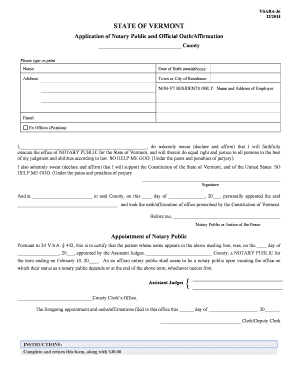
Get Patron Registration Form - Vtprofessionals
How it works
-

Open form follow the instructions
-

Easily sign the form with your finger
-

Send filled & signed form or save
How to fill out the PATRON REGISTRATION FORM - Vtprofessionals online
Filling out the PATRON REGISTRATION FORM - Vtprofessionals is an essential step for individuals seeking to register as a patron. This guide will provide clarity on each section of the form, ensuring a smooth and comprehensive completion process.
Follow the steps to successfully complete the PATRON REGISTRATION FORM - Vtprofessionals.
- Click ‘Get Form’ button to obtain the form and open it in your editor.
- Begin by entering your full name in the designated field. Ensure that you type or print clearly to avoid any processing errors.
- Provide your date of birth in the format mm/dd/yyyy. This aids in establishing your identity.
- Fill in your complete address, including street number and name, city, state, and ZIP code to ensure accurate documentation.
- Indicate your town or city of residence. This information is necessary for your registration.
- If you are a non-Vermont resident, complete the section that asks for the name and address of your employer.
- Enter your email address in the specified field. This will be used for any correspondence regarding your application.
- In the ‘Ex Officio (Position)’ field, indicate your position if applicable.
- Read the oath carefully, and upon understanding its implications, sign your name in the designated signature field.
- Complete the section for the notary or justice of the peace as required, ensuring to notarize your signature.
- Lastly, prepare to submit the form. Follow the instructions for payment and ensure you return the completed form with a $30.00 fee to the appropriate county clerk's office. Include a self-addressed, stamped envelope for your convenience.
- Finally, save your changes, download, and/or print the form as needed for your records.
Start completing the PATRON REGISTRATION FORM - Vtprofessionals online today!
A floating footer bar is an element that has the ability to “stick” and remain visible as users scroll up and down your page.