Loading
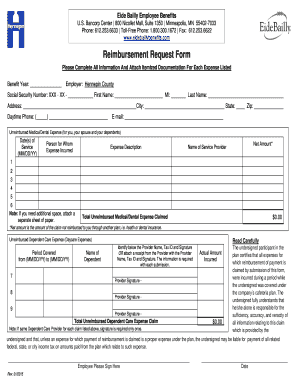
Get Bancorp Center 800 Nicollet Mall
How it works
-

Open form follow the instructions
-

Easily sign the form with your finger
-

Send filled & signed form or save
How to fill out the Bancorp Center 800 Nicollet Mall online
Filling out the Bancorp Center 800 Nicollet Mall form online is a straightforward process that allows for efficient submission of important reimbursement requests. This guide will provide you with step-by-step instructions to successfully complete the form and ensure all necessary information is accurately provided.
Follow the steps to complete the form online successfully.
- Click the ‘Get Form’ button to retrieve the form and access it for online editing.
- Begin by entering the benefit year in the designated field. This indicates the time frame for which you are claiming expenses.
- Fill in the employer's name, which is Hennepin County, and your social security number, first name, middle initial, and last name in the respective fields.
- Provide your complete address, including city, state, and zip code. This ensures that your information is accurate for correspondence purposes.
- Include your daytime phone number and email address to facilitate communication regarding your form submission.
- For unreimbursed medical or dental expenses, list the date(s) of service, the person for whom the expense was incurred, a brief description of the expense, the net amount of the claim, and the name of the service provider in the provided table.
- If you require more space for additional expenses, attach a separate sheet of paper including all necessary details.
- Calculate and enter the total amount of unreimbursed medical or dental expenses claimed at the bottom of the section.
- For unreimbursed dependent care expenses, fill in the period covered and name of the dependent in the specified fields.
- Identify the provider name, tax ID, and include the provider's signature. Alternatively, attach a receipt that contains this information.
- Complete the total amount of the unreimbursed dependent care expense claim at the bottom of this section.
- Read the certification statement carefully, then sign and date it to affirm the accuracy and completeness of your claim.
- Once all fields are properly completed, make sure to save your changes. You can download, print, or share the completed form as needed.
Complete your documents online today to ensure timely processing!
The U.S. Bancorp Tower (also known as the Big Pink) is a 42-story, 163.38 m (536.0 ft) skyscraper in Portland, Oregon.
Industry-leading security and compliance
US Legal Forms protects your data by complying with industry-specific security standards.
-
In businnes since 199725+ years providing professional legal documents.
-
Accredited businessGuarantees that a business meets BBB accreditation standards in the US and Canada.
-
Secured by BraintreeValidated Level 1 PCI DSS compliant payment gateway that accepts most major credit and debit card brands from across the globe.