Loading
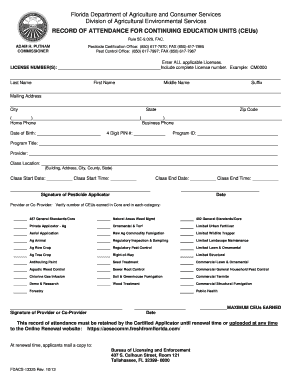
Get Record Of Attendance For Continuing Education Units (ceus)
How it works
-

Open form follow the instructions
-

Easily sign the form with your finger
-

Send filled & signed form or save
How to fill out the RECORD OF ATTENDANCE FOR CONTINUING EDUCATION UNITS (CEUs) online
This guide provides a step-by-step approach to filling out the Record of Attendance for Continuing Education Units (CEUs) online. Whether you are a first-time user or familiar with digital forms, this guide will ensure you complete the process successfully.
Follow the steps to complete your CEU record online.
- Click ‘Get Form’ button to access the form and open it in your digital editor.
- Enter all applicable licenses in the designated field by providing complete license numbers. For instance, if your license number is CM0000, enter that information accurately.
- Fill in the personal details including last name, first name, middle name (if applicable), and suffix (if any). Make sure to double-check for spelling errors.
- Provide your mailing address, and ensure to include the city, state, and zip code correctly.
- Fill out your home phone and business phone numbers, ensuring all digits are accurate.
- Enter your date of birth in the specified format to avoid any discrepancies.
- Input your 4-digit PIN number as instructed in the appropriate section.
- Provide the Program ID and Program Title by accurately describing the education program you attended.
- Fill out the provider’s name and class location, which should include details like building name, address, city, county, and state.
- Record the class start date, start time, end date, and end time in the specified fields, ensuring proper formatting.
- Sign the form where indicated, as the signature of the pesticide applicator is required for validation.
- Date your signature in the corresponding area after signing.
- Have the provider or co-provider verify the number of CEUs earned in the relevant categories by signing and dating the form.
- Once all sections are completed, save changes, and choose to download, print, or share the form as necessary.
Complete your RECORD OF ATTENDANCE FOR CONTINUING EDUCATION UNITS (CEUs) online for efficient record-keeping.
Click on Requirements, then select the CE tab on the requirements page. The Department of Health, Division of Medical Quality Assurance, will now review your continuing education records in the electronic tracking system at the time of renewal.