Loading
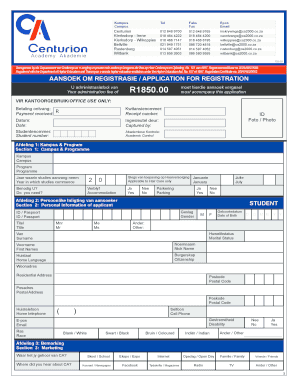
Get Inskrywibngsca2000coza Form
How it works
-

Open form follow the instructions
-

Easily sign the form with your finger
-

Send filled & signed form or save
How to fill out the Inskrywibngsca2000coza form online
The Inskrywibngsca2000coza form is essential for applicants seeking registration at Centurion Academy. This guide provides a step-by-step approach to help users complete the form efficiently and accurately.
Follow the steps to successfully complete the form online.
- Click 'Get Form' button to obtain the form and open it in the editor.
- Complete Section 1: Campus & Programme. Select your preferred campus and program of study. Indicate the year when your studies will commence.
- Fill out Section 2: Personal Information of applicant. This includes entering your gender, ID or passport number, title, date of birth, full names, nickname, home language, and citizenship. Provide your residential and postal addresses, contact numbers, and email.
- In Section 3: Marketing, indicate where you heard about the academy, choosing from options such as school, newspaper, or friends.
- Section 4: Details regarding school education requires you to provide the name of your school, town or city, last grade completed, and recent subjects with their corresponding marks.
- Complete Section 5: Next of kin, providing details about an emergency contact person, including their relationship to you, ID number, occupation, employer, and contact information.
- In Section 6: Information of person responsible for payment of fees, enter the details of the person who will cover the costs. This includes their full names, occupation, relationship to the student, and contact information.
- Section 7: Payment Options requires you to select your payment method. If choosing to pay in installments, fill in relevant information regarding your financial situation.
- Proceed to Sections 8 and 9, where you and the person responsible for payments must declare your understanding of the financial obligations and your commitment to the program.
- Follow the instructions in Section 10: Indemnity Form & Medical information, providing any medical conditions and emergency contact details. Ensure consent is given for the academy to be indemnified.
- Finally, review the form for accuracy, then save your changes, and consider downloading, printing, or sharing the completed form.
Complete your Inskrywibngsca2000coza form online today to take the next step in your educational journey.
When looking to format a transcript, you should pay attention to several important elements, including: Font type and size. ... Paragraphs, headings, and page number. ... Speaker labels. ... Time stamps. ... Tagging inaudible speech and crosstalk. ... Language. ... Background sounds. ... Capitalization.