We use cookies to improve security, personalize the user experience, enhance our marketing activities (including cooperating with our marketing partners) and for other business use.
Click "here" to read our Cookie Policy. By clicking "Accept" you agree to the use of cookies. Read less
Read more
Accept
Loading
Form preview
  • US Legal Forms
  • Form Library
  • More Forms
  • More Uncategorized Forms
  • Haltom High School Homecoming Parade Permission Form

Get Haltom High School Homecoming Parade Permission Form

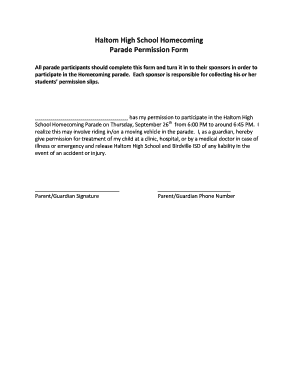
Haltom High School Homecoming Parade Permission Form All parade participants should complete this form and turn it in to their sponsors in order to participate in the Homecoming parade. Each sponsor.

How it works

  1. Open form

    Open form follow the instructions

  2. Easily sign form

    Easily sign the form with your finger

  3. Share form

    Send filled & signed form or save

How to fill out the Haltom High School Homecoming Parade Permission Form online

Filling out the Haltom High School Homecoming Parade Permission Form is an essential step for all parade participants. This guide provides a comprehensive overview of each section of the form to ensure a smooth completion process.

Follow the steps to successfully fill out the form online.

  1. Click the ‘Get Form’ button to obtain and open the Haltom High School Homecoming Parade Permission Form for editing.
  2. In the space provided, write the name of the participant who has your permission to join the parade. This should be the individual’s full name.
  3. Review the event details and ensure that you understand the date and time of the parade, which is set for Thursday, September 26th, from 6:00 PM to around 6:45 PM.
  4. Acknowledge the understanding of potential risks by reading the statement regarding the possibility of riding in a moving vehicle during the parade.
  5. If you, as a guardian, are giving permission for medical treatment in case of an emergency, ensure you confirm this by checking the relevant field.
  6. Provide your signature in the designated area labeled 'Parent/Guardian Signature' to validate your consent.
  7. Enter your contact number in the 'Parent/Guardian Phone Number' field to ensure you can be reached in case of any issues.
  8. After completing all the fields, review the form for accuracy. Then, save any changes made, and proceed to download, print, or share the form as necessary.

Complete the Haltom High School Homecoming Parade Permission Form online today!

Get form

Experience a faster way to fill out and sign forms on the web. Access the most extensive library of templates available.
Get form

Related content

P O L I C E Club - City of Wylie
Crisis Assistance · Records Requests · Property Release · Victim Services · Take Me...
Learn more
Carroll Senior High School / Homepage
School News. Need a Parking Pass? Parking Permits for Second Semester are on Sale Now...
Learn more

Related links form

CFX-CHX-SER Rev B.indd DETAILS OF INTRODUCER Hairline Template Printable Nadharia Ya Uhalisia

Questions & Answers

Get answers to your most pressing questions about US Legal Forms API.

Contact support

The link tag is absolutely positioned to its parent which is relatively positioned, and will now fill the whole parent tag. You can either wrap the link tag around the inner HTML elements or let it sit on its own – if the latter is applied then a z-index property may need to be applied to trump other HTML elements.

You can do this within your CSS by setting the anchor-name property on the anchor element. It accepts a dashed-ident value. Alternatively, you will be able to define an anchor in your HTML with the anchor attribute. The attribute value is the ID of the anchor element.

0:33 1:47 Adding Internal Document Links in Microsoft Word - YouTube YouTube Start of suggested clip End of suggested clip The text that you wish to be linked. And this time select hyperlink. From the same insert menu. FromMoreThe text that you wish to be linked. And this time select hyperlink. From the same insert menu. From here you're going to click on the bookmark. Button on the right-hand. Side.

First you'll need to set the display to block as links are inline elements. Then you'll need to change the position to absolute, which will remove them from the page flow. Then you can utilize top and left attributes. HTML is used to structure the layout of your page, CSS is used to change its appearance.

Here are four steps to link to a specific part of a page: Give a title to the text you'd like to link. ... Put the title into an opening HTML anchor link tag. ... Insert the anchor tags around the text you want to link to. ... Create a hyperlink that leads you to the text.

Get This Form Now!

Use professional pre-built templates to fill in and sign documents online faster. Get access to thousands of forms.
Get form
If you believe that this page should be taken down, please follow our DMCA take down processhere.

Industry-leading security and compliance

US Legal Forms protects your data by complying with industry-specific security standards.
  • In businnes since 1997
    25+ years providing professional legal documents.
  • Accredited business
    Guarantees that a business meets BBB accreditation standards in the US and Canada.
  • Secured by Braintree
    Validated Level 1 PCI DSS compliant payment gateway that accepts most major credit and debit card brands from across the globe.
Get Haltom High School Homecoming Parade Permission Form
Get form
Form Packages
Adoption
Bankruptcy
Contractors
Divorce
Home Sales
Employment
Identity Theft
Incorporation
Landlord Tenant
Living Trust
Name Change
Personal Planning
Small Business
Wills & Estates
Packages A-Z
Form Categories
Affidavits
Bankruptcy
Bill of Sale
Corporate - LLC
Divorce
Employment
Identity Theft
Internet Technology
Landlord Tenant
Living Wills
Name Change
Power of Attorney
Real Estate
Small Estates
Wills
All Forms
Forms A-Z
Form Library
Customer Service
Terms of Service
Privacy Notice
Legal Hub
Content Takedown Policy
Bug Bounty Program
About Us
Help Portal
Legal Resources
Blog
Affiliates
Contact Us
Delete My Account
Site Map
Industries
Forms in Spanish
Localized Forms
State-specific Forms
Forms Kit
Legal Guides
Real Estate Handbook
All Guides
Prepared for You
Notarize
Incorporation services
Our Customers
For Consumers
For Small Business
For Attorneys
Our Sites
US Legal Forms
USLegal
FormsPass
pdfFiller
signNow
airSlate WorkFlow
DocHub
Instapage
Social Media
Call us now toll free:
+1 833 426 79 33
As seen in:
  • USA Today logo picture
  • CBC News logo picture
  • LA Times logo picture
  • The Washington Post logo picture
  • AP logo picture
  • Forbes logo picture
© Copyright 1997-2025
airSlate Legal Forms, Inc.
3720 Flowood Dr, Flowood, Mississippi 39232
Form Packages
Adoption
Bankruptcy
Contractors
Divorce
Home Sales
Employment
Identity Theft
Incorporation
Landlord Tenant
Living Trust
Name Change
Personal Planning
Small Business
Wills & Estates
Packages A-Z
Form Categories
Affidavits
Bankruptcy
Bill of Sale
Corporate - LLC
Divorce
Employment
Identity Theft
Internet Technology
Landlord Tenant
Living Wills
Name Change
Power of Attorney
Real Estate
Small Estates
Wills
All Forms
Forms A-Z
Form Library
Customer Service
Terms of Service
Privacy Notice
Legal Hub
Content Takedown Policy
Bug Bounty Program
About Us
Help Portal
Legal Resources
Blog
Affiliates
Contact Us
Delete My Account
Site Map
Industries
Forms in Spanish
Localized Forms
State-specific Forms
Forms Kit
Legal Guides
Real Estate Handbook
All Guides
Prepared for You
Notarize
Incorporation services
Our Customers
For Consumers
For Small Business
For Attorneys
Our Sites
US Legal Forms
USLegal
FormsPass
pdfFiller
signNow
airSlate WorkFlow
DocHub
Instapage
Social Media
Call us now toll free:
+1 833 426 79 33
As seen in:
  • USA Today logo picture
  • CBC News logo picture
  • LA Times logo picture
  • The Washington Post logo picture
  • AP logo picture
  • Forbes logo picture
© Copyright 1997-2025
airSlate Legal Forms, Inc.
3720 Flowood Dr, Flowood, Mississippi 39232