Loading
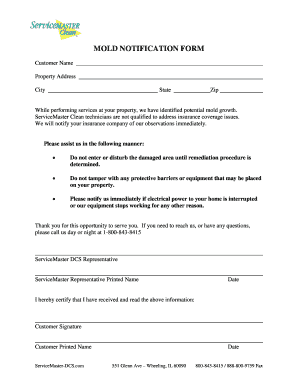
Get Mold Notification Form - Servicemaster Dcs
How it works
-

Open form follow the instructions
-

Easily sign the form with your finger
-

Send filled & signed form or save
How to fill out the Mold Notification Form - ServiceMaster DCS online
Filling out the Mold Notification Form is an essential step in addressing potential mold growth identified at your property. This guide provides clear, step-by-step instructions to help you complete the form online efficiently.
Follow the steps to successfully fill out the Mold Notification Form.
- Press the ‘Get Form’ button to retrieve the Mold Notification Form and open it in your chosen document editor.
- Begin by entering your customer name in the designated field. Ensure that the name matches the records associated with your property.
- Next, fill in the property address where the mold issue has been identified. This should include the street address, ensuring accuracy for service purposes.
- Continue by entering the city of the property in the corresponding field, followed by the state field to indicate the appropriate state of residence.
- Complete the form by inputting the zip code related to the property. Accurate zip code entry is crucial for effective communication.
- Review the instructional statements regarding mold remediation. Acknowledge the importance of not entering the damaged area until remediation procedures are established, and do not disturb protective barriers or equipment.
- Provide your signature as the customer, affirming that you have received and understood the information provided. Include your printed name and the date of signing to validate your acknowledgment.
- Finally, save any changes made to the form. You may download, print, or share the completed form as necessary for your records or to provide to ServiceMaster DCS representatives.
Complete your Mold Notification Form online today to ensure timely and effective action on your mold concerns.
Industry-leading security and compliance
US Legal Forms protects your data by complying with industry-specific security standards.
-
In businnes since 199725+ years providing professional legal documents.
-
Accredited businessGuarantees that a business meets BBB accreditation standards in the US and Canada.
-
Secured by BraintreeValidated Level 1 PCI DSS compliant payment gateway that accepts most major credit and debit card brands from across the globe.