Loading
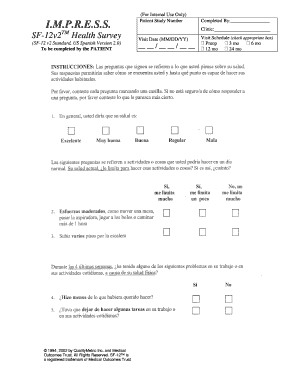
Get Mos Sf 12 General Health Survey
How it works
-

Open form follow the instructions
-

Easily sign the form with your finger
-

Send filled & signed form or save
How to fill out the Mos Sf 12 General Health Survey online
This guide provides a step-by-step approach to completing the Mos Sf 12 General Health Survey online. It is designed to assist users at all experience levels with filling out this important health document accurately and efficiently.
Follow the steps to complete the survey effortlessly.
- Click ‘Get Form’ button to obtain the survey and open it in an appropriate editor.
- Begin by entering the Patient Study Number in the specified field, which is essential for identifying your survey.
- Next, fill in the name of the person completing the survey. This could be the patient or an authorized representative.
- In the Clinic section, indicate the name of the clinic administering the survey. This helps in associating the survey with the correct location.
- For the Visit Date, enter the date of the patient's visit using the format MM/DD/YY.
- Then, check the appropriate box corresponding to the Visit Schedule — options include Preop, 3 months, 6 months, 12 months, or 24 months. This indicates when the survey is being completed.
- After filling all necessary fields, review the information entered to ensure accuracy.
- Finally, save your changes, download a copy of the form, print it for your records, or share it as needed.
Complete your Mos Sf 12 General Health Survey online today for a comprehensive assessment of your health.
The SF-12v2 is a health-related quality-of-life questionnaire consisting of twelve questions that measure eight health domains to assess physical and mental health. Physical health-related domains include General Health (GH), Physical Functioning (PF), Role Physical (RP), and Body Pain (BP).