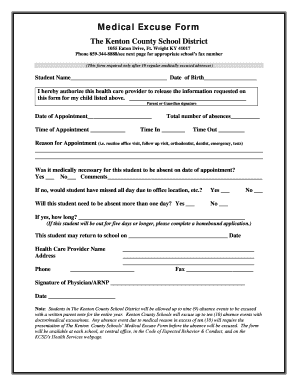
Medical Excuse Form The Kenton County School District 1055 Eaton Drive, Ft. Wright KY 41017 Phone 859-344-8888/see next page for appropriate school s fax number (This form required only after 10 regular.

How it works
  • Open form

    Open form follow the instructions

  • Easily sign form

    Easily sign the form with your finger

  • Share form

    Send filled & signed form or save

How to fill out the Medical Excuse Form - Kenton County Schools online

The Medical Excuse Form for Kenton County Schools is essential for documenting medically excused absences after 10 regular absences. This guide aims to help users complete the form accurately and efficiently in an online format.

Follow the steps to fill out the Medical Excuse Form smoothly.

  1. Press the ‘Get Form’ button to obtain the Medical Excuse Form and open it in your preferred editor.
  2. Begin filling out the form by entering the student’s name and date of birth in the designated fields.
  3. Authorize the release of information by providing the parent or guardian’s signature in the appropriate section.
  4. Indicate the date and time of the medical appointment by filling in those specific fields.
  5. Record the total number of absences related to this medical excuse in the provided space.
  6. Fill in the checkboxes to confirm if the absence was medically necessary, whether the student needs to be absent more than one day, and provide any necessary comments.
  7. If applicable, specify how many additional days the student will be absent for medical reasons.
  8. Fill in the expected return date for the student in school.
  9. Complete the health care provider’s section by providing their name, address, and phone number.
  10. Have the healthcare provider sign and date the form to validate it.
  11. Save your changes, then proceed to download, print, or share the completed form as necessary.

Complete your Medical Excuse Form online today to ensure your student's absences are appropriately documented.

Get form

Experience a faster way to fill out and sign forms on the web. Access the most extensive library of templates available.

Related content

Health Forms - Kentucky Department of Education

Aug 9, 2020 — Call the KY Department for Public Health's COVID-19 hotline at (800)...

Learn more
Absences from Class for Health Reasons | UK...

University Health Service (UHS) does not provide students with excuses for absences or...

Learn more
Flat tax - Wikipedia

A flat tax is a tax system where the tax payment is calculated as fixed percentage of...

Learn more
Questions & Answers

Get answers to your most pressing questions about US Legal Forms API.

Contact support

How do I extract text from a voice recording?

How It Works Upload your audio to our secure cloud-based servers. We convert your audio to text using latest automated transcription technology. Edit and perfect the transcription in minutes using our online editor. Share and export your transcript into a variety of formats including Word, PDF and SRT. That's it!

0:50 3:17 Microsoft Word - Create a Transcript from video / audio automatically. YouTube Start of suggested clip End of suggested clip Based on the audio. You can also click the edit button and choose who was actually spoken. So youMoreBased on the audio. You can also click the edit button and choose who was actually spoken. So you can put in names here and you'll also be able to edit any of the transcript. If there's any mistakes.

Using 360 Converter: Go to the 360 Converter website. Upload an MP3 file from your device or Cloud Storage, or paste a file URL. Select the language of the audio file. Set the start and end times of the file that you want to transcribe. Tick the box beside I agree to the Terms & Conditions and click Start Conversion.

1:58 9:46 How to Transcribe Audio to Text in Microsoft Word - YouTube YouTube Start of suggested clip End of suggested clip And as i speak you'll see that my text is showing up on the word document as i speak. I'm going toMoreAnd as i speak you'll see that my text is showing up on the word document as i speak. I'm going to turn off dictation.

How to Transcribe MP3 to Text: Upload an MP3 file. Upload your MP3 file to VEED. ... Convert to text. Under Subtitles, click on 'Auto Transcribe', select your preferred language, and you're done! ... Download your text file.

Convert audio to text in 3 steps Upload a file to Notta. Click the 'Select File' to browse or drag and drop your file. Convert audio to text. Select the audio language you want to transcribe. ... Get transcript via email. Once the transcription is finished, Notta will send the result to the email address you just entered.

Get This Form Now!

Use professional pre-built templates to fill in and sign documents online faster. Get access to thousands of forms.

If you believe that this page should be taken down, please follow our DMCA take down process here.

Get Medical Excuse Form - Kenton County Schools