Loading
Get Rsd 44
How it works
-

Open form follow the instructions
-

Easily sign the form with your finger
-

Send filled & signed form or save
How to fill out the Rsd 44 online
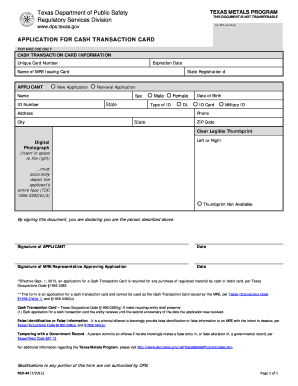
The Rsd 44 form is a crucial document for individuals applying for a cash transaction card within the Texas Metals Program. This guide provides clear, step-by-step instructions to assist users in completing the form accurately and efficiently online.
Follow the steps to successfully complete the Rsd 44 form.
- Click the ‘Get Form’ button to access the Rsd 44 form and open it in your preferred online form editor.
- Fill in the cash transaction card information. Enter the unique card number and expiration date if applicable.
- Indicate the nature of your application by selecting either 'New Application' or 'Renewal Application' by checking the appropriate box.
- Provide your personal information. Enter your name, identifier number, and date of birth in the specified fields along with your contact details, including your address, city, state, and ZIP code.
- Select your type of ID by checking the appropriate option, whether it is a driver's license (DL), ID card, or military ID.
- Affix a clear, legible thumbprint and digital photograph to the designated area. Ensure that the photograph depicts your entire face.
- If a thumbprint is not available, mark the 'Thumbprint Not Available' option.
- Review the information you've provided on the form to ensure accuracy and completeness.
- Sign the form in the designated area to declare you are the individual described above. Include the date of your signature.
- If applicable, ensure the signature of the MRE representative approving the application is included along with the date.
- After completing the form, you will have the option to save changes, download, print, or share the form for submission.
Begin your online application for the Rsd 44 form today and ensure you meet all necessary requirements.