Loading
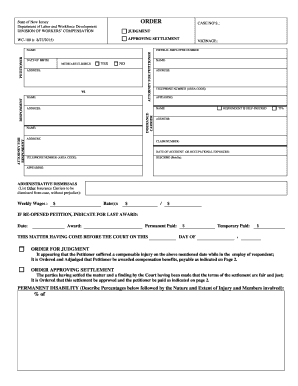
Get Order For Judgment Order Approving Settlement ...
How it works
-

Open form follow the instructions
-

Easily sign the form with your finger
-

Send filled & signed form or save
How to fill out the order for judgment order approving settlement online
Filling out the order for judgment order approving settlement is a crucial step in the workers’ compensation process. This guide will provide clear instructions to help users accurately complete the form online, ensuring a smooth submission experience.
Follow the steps to fill out the order for judgment order approving settlement.
- Click the ‘Get Form’ button to obtain the form and open it in your editor.
- Begin by entering the petitioner's name and address in the designated fields. This information is essential for identifying the individual involved in the case.
- Fill in the date of birth and indicate whether the petitioner is Medicare eligible by selecting 'yes' or 'no'.
- Provide the respondent's name, insurance carrier details, and attorney’s name in the respective sections.
- Input the case number and the federal employer number, which are crucial for tracking the case.
- Describe the accident or occupational exposure in brief, including the date, to provide context for the settlement.
- List any administrative dismissals by naming other insurance carriers involved in the case.
- Complete the sections for weekly wages and any rates that apply to the settlement.
- If this is a re-opened petition, indicate the relevant prior award date and amount in the specified section.
- Review the order for judgment section ensuring it reflects that the petitioner is awarded compensation benefits as outlined.
- In the order approving settlement section, confirm that you agree with the terms and that the settlement is deemed fair.
- Indicate any medical bills or additional fees that should be considered, and ensure all financial amounts are correctly calculated.
- Finally, save your changes, and choose to download, print, or share the completed form as necessary.
Complete your documents online today to ensure a timely and accurate submission.
A person, upon whom process has not been served within one year of commencement of the action against him, may make a special appearance, which does not constitute a general appearance, to file a motion to dismiss.