Loading
Get Ihavebenefits
How it works
-

Open form follow the instructions
-

Easily sign the form with your finger
-

Send filled & signed form or save
How to fill out the Ihavebenefits online
This guide provides a clear and comprehensive overview of how to efficiently complete the Ihavebenefits supplementary health statement of expenses online. By following the steps outlined below, you can ensure that your claims are accurately submitted and processed in a timely manner.
Follow the steps to successfully complete your form.
- Press the ‘Get Form’ button to access the form and open it within the designated editor.
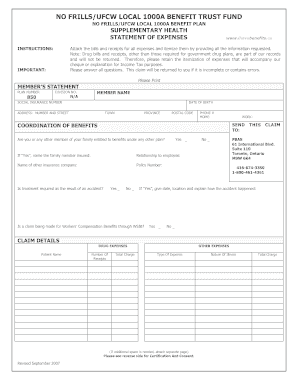
- Begin by entering your member's statement details, including the plan number, division number, your name, social insurance number, date of birth, and your full address including number, street, town, province, and postal code.
- Provide your home and work phone numbers for contact purposes.
- In the coordination of benefits section, indicate whether you or a family member is entitled to benefits under another plan by selecting ‘Yes’ or ‘No’. If you select ‘Yes’, provide the respective family member's name, relationship to you, the name of the other insurance company, and the policy number.
- Indicate if the treatment is a result of an accident by selecting ‘Yes’ or ‘No’. If ‘Yes’, describe the accident's details, including the date, location, and explanation.
- Answer whether a claim for Workers’ Compensation Benefits is being made through WSIB by selecting ‘Yes’ or ‘No’.
- For claim details, list your drug expenses by providing the patient name, the number of receipts, and the total charge. For other expenses, specify the type of expense and total charge.
- If additional space is required for listing expenses, attach a separate page as necessary.
- Review the certification and consent section. By signing, you declare that the information is true and consent to the use of your social insurance number for identity verification.
- Sign and date the form, ensuring that if an expense was incurred by a dependant child aged 18 or older, they also sign the form.
- Attach all relevant receipts and bills to the completed form, ensuring they are itemized as required.
- Once you have filled out the form and attached the necessary documents, you can save your changes, download the form, print it for your records, or share it as needed.
Complete your Ihavebenefits documents online today to ensure your claims are processed efficiently.