Loading
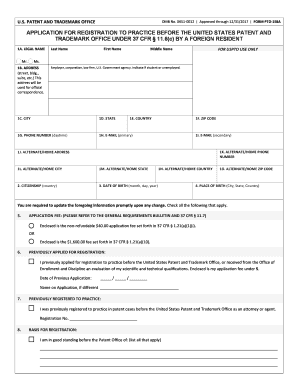
Get 37 Cfr 11 6 C
How it works
-

Open form follow the instructions
-

Easily sign the form with your finger
-

Send filled & signed form or save
How to fill out the 37 CFR 11.6 C online
This guide provides a clear and supportive overview of how to fill out the 37 CFR 11.6 C form online for those seeking registration to practice before the United States Patent and Trademark Office. By following this step-by-step approach, users with varying levels of experience can successfully complete the form.
Follow the steps to complete the 37 CFR 11.6 C form online.
- Click the ‘Get Form’ button to obtain the form and open it in the editor. This action will allow you to start the process of completing your application.
- Enter your legal name in the designated fields: last name, first name, and middle name. Ensure accuracy as it will be used in all official correspondence.
- Provide your complete address, including street, building, suite, city, state, ZIP code, and country. This address will be used for all official communication regarding your application.
- Fill in your daytime phone number and primary email address. You may also provide a secondary email and alternate phone number, which can help streamline communication.
- Indicate your citizenship by specifying your country of citizenship. Additionally, enter your date of birth and place of birth, including city, state, and country.
- Choose the appropriate application fee option and ensure that the fee is enclosed with your submission. Review the requirements related to the application fees for accuracy.
- Provide information on any previous applications made for registration or previous registrations. This will assist in the assessment of your eligibility.
- Outline your basis for registration by listing any relevant patent offices you are in good standing with.
- Answer the background information questions truthfully and provide detailed statements for any relevant 'yes' answers. Remember to include supporting documents if required.
- List all degrees conferred to you, including the college name, date received, and major subject. Attach any required documentation as indicated.
- Sign and date the application to certify that all information provided is true and correct. A willfully false statement may lead to serious penalties.
- Once you have thoroughly reviewed your application, you can save your changes, download the form, print it, or share it as needed for processing.
Begin your application process by filling out the 37 CFR 11.6 C form online today.
Conditional Highlighting in Reports in Salesforce is used to highlight field values on summary or matrix reports based on ranges and colors you specify. To enable conditional highlighting, your report must contain at least one summary field or custom summary formula.