Loading
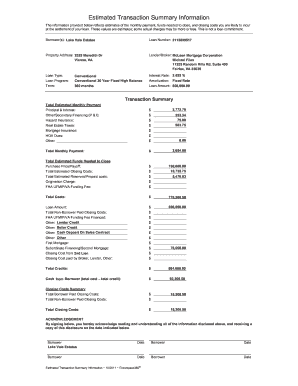
Get Estimated Transaction Summary Information - Sign-in
How it works
-

Open form follow the instructions
-

Easily sign the form with your finger
-

Send filled & signed form or save
How to fill out the Estimated Transaction Summary Information - Sign-in online
This guide provides comprehensive instructions on completing the Estimated Transaction Summary Information - Sign-in form online. It aims to clarify each section and field, making the process straightforward for all users, regardless of prior experience.
Follow the steps to easily fill out the form online.
- Click the ‘Get Form’ button to access the form and open it in your preferred online editor.
- Begin by filling in the 'Borrower(s)' section with the name of the individuals or entities involved in the transaction. In this case, it should read 'Lake Vale Estates'.
- Enter the 'Loan Number', which is a unique identifier for your transaction, in this example '2112099517'.
- Provide the 'Property Address', ensuring correct details for accurate processing: '2525 Meredith Dr, Vienna, VA'.
- Fill in the 'Lender/Broker' information including name, company, and address. For this form, it should state 'McLean Mortgage Corporation, Michael Filan, 11325 Random Hills Rd, Suite 400, Fairfax, VA 22030'.
- Complete the 'Loan Type' and 'Loan Program' sections, selecting 'Conventional' and 'Conventional 30 Year Fixed High Balance', respectively.
- Input the 'Term' as '360 months' to reflect the loan duration.
- Record the 'Interest Rate' as '3.625 %' and state that the 'Amortization' is on a 'Fixed Rate'.
- Fill in the 'Loan Amount', entering '608,000.00' in the corresponding field.
- Proceed to the 'Transaction Summary' section. Detail the estimated monthly payments for each category including 'Principal & Interest', 'Hazard Insurance', 'Real Estate Taxes', etc.
- For the 'Total Estimated Funds Needed to Close', calculate and enter the relevant sums for 'Purchase Price/Payoff', 'Total Estimated Closing Costs', and 'Total Estimated Reserves/Prepaid costs'.
- Summarize the 'Closing Costs Summary' by detailing both borrower and non-borrower paid closing costs, ensuring accuracy in the final total.
- Finally, affirm your understanding of the document by signing the acknowledgement section, ensuring that both borrower's names and dates are recorded properly.
- Once all information is filled, you can save changes, download, print, or share the completed form as necessary.
Complete and submit your documents online now for efficient processing.
If you filed online you can view this: when you've finished filling in your return (but before you submit it) - in the section 'View your calculation' in your final tax calculation - it can take up to 72 hours after you've submitted your return for this to be available in your account.
Industry-leading security and compliance
US Legal Forms protects your data by complying with industry-specific security standards.
-
In businnes since 199725+ years providing professional legal documents.
-
Accredited businessGuarantees that a business meets BBB accreditation standards in the US and Canada.
-
Secured by BraintreeValidated Level 1 PCI DSS compliant payment gateway that accepts most major credit and debit card brands from across the globe.