Loading
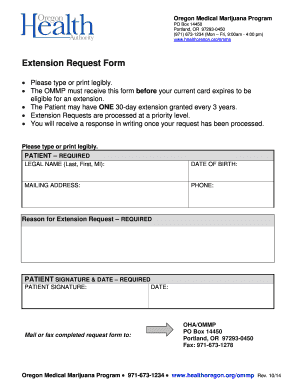
Get Duplicate Card Request - Public Health Oregon
How it works
-

Open form follow the instructions
-

Easily sign the form with your finger
-

Send filled & signed form or save
How to fill out the Duplicate Card Request - Public Health Oregon online
Filling out the Duplicate Card Request form for the Public Health Oregon is essential for ensuring you receive a replacement card efficiently. This guide provides clear instructions to help you navigate the online process with confidence.
Follow the steps to complete your Duplicate Card Request online.
- Click ‘Get Form’ button to obtain and open the Duplicate Card Request form online.
- Fill out the patient legal name section by entering your last name, first name, and middle initial. Ensure that the information is accurate to avoid delays in processing.
- Provide your date of birth in the designated field. This information is necessary for verifying your identity.
- Enter your mailing address in the required section. Make sure to include all relevant details to ensure proper delivery of your replacement card.
- Fill in your phone number in the appropriate field. This allows the office to contact you if there are any issues with your request.
- In the reason for duplicate card request section, clearly state why you need a duplicate card. This field is essential for processing your request.
- Sign and date the form in the patient signature section. Your signature certifies that the information provided is true and accurate.
- After completing the form, save your changes. You have the option to download, print, or share the form for your records.
Complete your Duplicate Card Request online today to ensure a smooth and efficient replacement process.
It typically takes 4 to 8 weeks to receive your certified birth certificate copy in the mail. If you need your replacement sooner, premium services such as VitalRecordsOnline.com offer a Rush Package with expedited shipping. Some states may even be able to provide a copy within 2-3 business days.