Loading
Get Research Request Form - Doi
How it works
-

Open form follow the instructions
-

Easily sign the form with your finger
-

Send filled & signed form or save
How to fill out the Research Request Form - Doi online
This guide will assist you in accurately completing the Research Request Form - Doi online. Each section of the form is designed to collect specific information necessary for your request, and understanding how to fill it out correctly will facilitate a smoother process.
Follow the steps to effectively complete your Research Request Form.
- Click ‘Get Form’ button to obtain the form and open it in the editor.
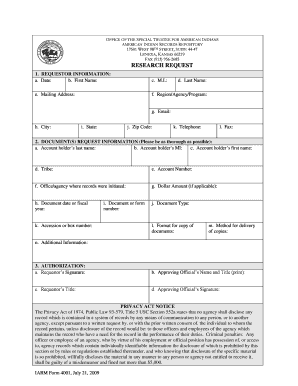
- In the Requestor Information section, fill in the following fields: a. Date: Input today’s date. b. First name: Provide your first name. c. M.I.: Include your middle initial. d. Last Name: Enter your last name. e. Mailing Address: Supply your mailing address, ensuring it is not a P.O. Box if you want documents sent via Federal Express. f. Region/Agency/Program: If relevant, specify the region, agency, and program office you are connected with. g. Email: Enter your email address. h. City: Identify your city. i. State: Indicate your state. j. Zip Code: Complete your zip code. k. Telephone: Provide your telephone number along with the area code. l. Fax: Include your fax number with the area code.
- In the Document(s) Request Information section, provide detailed information: a. Account holder’s last name: Enter the account holder's last name. b. Account holder’s MI: Input the account holder's middle initial. c. Account holder’s first name: Specify the account holder's first name. d. Tribe: State the Tribe associated with the request. e. Account number: Enter the account number. f. Office/agency where records were initiated: Include the office or agency name where records were created, if known. g. Dollar Amount: Indicate the dollar amount, if applicable. h. Document date or fiscal year: Provide the document's creation date or relevant fiscal year, if known. i. Document Type: Specify the type of document, if known. j. Accession or box number: Include the OST accession number or FRC box number if available. k. Document or form number: Input the form number if applicable. l. Format for copy of documents: Indicate the format you prefer for the document copies. m. Method for delivery of copies: State how you would like to receive the documents (e.g., fax, Federal Express). n. Additional Information: Provide other relevant information that may assist in locating the requested documents.
- In the Authorization section, complete the following: a. Requestor’s Signature: Sign to authorize your request. b. Approving Official’s Name and Title (print): Print the name and title of the approving official. c. Requestor’s Title: State your official title. d. Approving Official’s Signature: Ensure the approving official signs to authorize your request.
- If needed, use the Additional Information page to provide any extra details that may assist in your request.
- Finally, review the entire form for accuracy, then save your changes, download, print, or share the completed form as needed.
Complete your Research Request Form online today and ensure your requests are managed efficiently.
If Y = log(y) and X = log(x) then Y = nX. This shows the linear relationship. Plotting Y against X, i.e., log(y) against log(x), leads to a straight line as shown below.