Loading
Get Security Refund Application
How it works
-

Open form follow the instructions
-

Easily sign the form with your finger
-

Send filled & signed form or save
How to fill out the Security Refund Application online
Completing the Security Refund Application online is a straightforward process. This guide will provide you with step-by-step instructions to ensure that your application is filled out correctly and submitted efficiently.
Follow the steps to complete your application successfully.
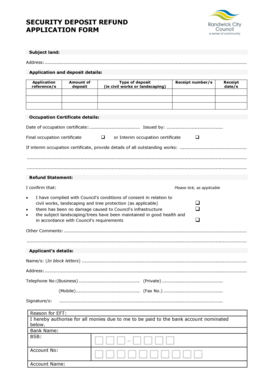
- Click ‘Get Form’ button to obtain the form and open it in the document management system.
- Enter the subject land address in the designated field to identify the property related to the security deposit.
- Fill in the application reference number(s) and details pertaining to the deposit, including the amount, type of deposit (e.g., civil works or landscaping), receipt number(s), and receipt date(s).
- Provide the date and issuer of the occupation certificate. Indicate whether you have a final or interim occupation certificate by checking the appropriate box.
- If you have an interim occupation certificate, describe any outstanding works that need to be completed.
- Check the appropriate boxes to confirm compliance with Council's conditions of consent regarding civil works, landscaping, and tree protection.
- In the comments section, include any additional notes or information relevant to your application.
- Enter the applicant’s details, including names in block letters, address, and telephone number(s) for business, private, and mobile contacts.
- Provide your signature to validate the application.
- In the reason for EFT section, fill in the bank name, BSB, account number, and account name for the refund to be processed.
- Once you have completed the form, save your changes, and download or print the document for your records before submitting it.
Complete your Security Refund Application online today to initiate your refund process.
Is returning a security deposit an expense? No. Returning a refundable security deposit that you previously received from a tenant is not an expense. You refund money paid as a security deposit at the end of the lease provided that the terms of the lease are met.
Industry-leading security and compliance
US Legal Forms protects your data by complying with industry-specific security standards.
-
In businnes since 199725+ years providing professional legal documents.
-
Accredited businessGuarantees that a business meets BBB accreditation standards in the US and Canada.
-
Secured by BraintreeValidated Level 1 PCI DSS compliant payment gateway that accepts most major credit and debit card brands from across the globe.