Loading
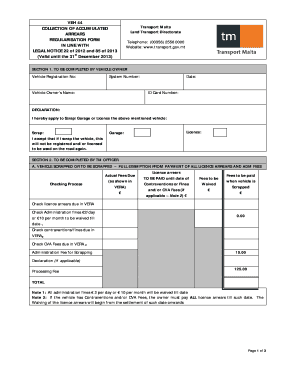
Get Veh 44 - Regularisation Form For The Collection Of Accumulated Arrears
How it works
-

Open form follow the instructions
-

Easily sign the form with your finger
-

Send filled & signed form or save
How to fill out the VEH 44 - Regularisation form for the collection of accumulated arrears online
Filling out the VEH 44 - Regularisation form for the collection of accumulated arrears online can streamline the process of addressing vehicle-related issues. This guide provides step-by-step instructions to ensure you complete the form accurately and efficiently.
Follow the steps to complete the form effectively.
- Click the ‘Get Form’ button to access the VEH 44 - Regularisation form and open it in your preferred editor.
- In SECTION 1, begin by entering the vehicle registration number, system number, and vehicle owner’s name. Provide the date and your ID card number as necessary.
- Make a declaration regarding your intention to scrap, garage, or license the vehicle. This includes checking the corresponding box for your chosen action.
- Proceed to SECTION 2. If scrapping the vehicle, mark that you seek a full exemption from payment of all licence arrears and administrative fees. Fill out the details of any actual fees due and amounts to be paid.
- For garaging the vehicle, ensure you indicate the reduction of fifty percent of all arrears in circulation licence fees. Input the necessary amounts as shown in your verification system (VERA) related to licence arrears.
- If paying the vehicle licence for regularisation, complete the relevant fields, including any amounts applicable and fees to be waived.
- In SECTION 3, agree to the indemnity clause by signing it, and ensure a Transport Malta officer also signs and stamps their section.
- SECTION 4 must be reviewed by the accounts section. Make sure there is a notation of total amounts received, name and date of verification to finalize your form.
- Once all sections are completed, save your changes. Depending on your needs, you can choose to download, print, or share the form accordingly.
Complete your VEH 44 - Regularisation form online to effectively manage your vehicle's accumulated arrears today.
The placement of figures and tables should be at the center of the page. It should be properly referenced and ordered in the number that it appears in the text. In addition, tables should be set apart from the text. Text wrapping should not be used.
Industry-leading security and compliance
US Legal Forms protects your data by complying with industry-specific security standards.
-
In businnes since 199725+ years providing professional legal documents.
-
Accredited businessGuarantees that a business meets BBB accreditation standards in the US and Canada.
-
Secured by BraintreeValidated Level 1 PCI DSS compliant payment gateway that accepts most major credit and debit card brands from across the globe.