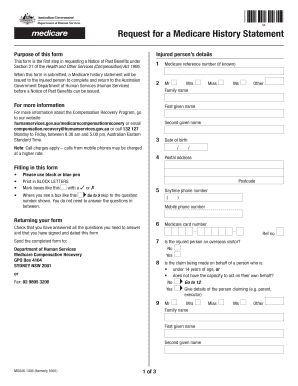
Request for a Medicare History Statement 04 RequestCompensation payer s History Statement for a Medicare details This form is the first step in requesting a Notice of Past Benefits under Section 21.
Open form follow the instructions
Easily sign the form with your finger
Send filled & signed form or save
How to fill out the Medicare Claims History Statement Request online
This guide provides clear and comprehensive instructions for users to fill out the Medicare Claims History Statement Request online. The process is designed to ensure that all necessary information is submitted correctly and efficiently.
Follow the steps to complete the request form accurately.
- Click ‘Get Form’ button to obtain the form and access it in your preferred online tool.
- Enter the name of the compensation payer in the designated field. Ensure that the information is accurate to avoid delays in processing.
- Fill in the injured person's details, including their full name and Medicare reference number if known. This information is critical for identifying the individual's claim.
- Provide the injured person’s date of birth, ensuring that the format is day/month/year to meet requirements. This assists in verifying the identity of the injured individual.
- Complete the postal address fields with the current address of the injured person. This is where all correspondence will be sent.
- Specify the type of compensation being claimed by choosing the appropriate option from the list provided. This helps categorize the claim correctly.
- Indicate whether the injured person is under 14 years of age or mentally incapacitated; this information is essential for the claim's review.
- If applicable, provide the names of any other compensation payers involved in the claim. This ensures that all parties are accounted for in the request.
- Fill in the details of the person making the claim on behalf of the injured individual, if relevant. It’s important to clarify this relationship.
- Review the information for accuracy and completeness. Ensure that the form is signed and dated before submission.
- After filling out the form, you can save your changes, download, print, or share the completed document.
Complete your Medicare Claims History Statement Request online today to ensure timely processing of your claim.
Experience a faster way to fill out and sign forms on the web. Access the most extensive library of templates available.
Related content
This form is available both in English and Spanish. I want to file a claim for services...
0938-0787. REQUEST FOR EMPLOYMENT INFORMATION. WHAT IS THE PURPOSE OF THIS FORM? In order...
ADULT HEALTH HISTORY FORM . . . . . . . . . . . . . . 42 ... There are two types of...
Get answers to your most pressing questions about US Legal Forms API.
Does Medicare send out statements?
It's a notice that people with Original Medicare get in the mail every 3 months for their Medicare Part A and Part B-covered services. The MSN shows: All your services or supplies that providers and suppliers billed to Medicare during the 3-month period. What Medicare paid.
How do I get a copy of my Medicare statement?
If you have received services but have not received an MSN, call 1-800-MEDICARE or access your MSN online by creating or logging into your secure Medicare account at ,medicare.gov/account (however, you should still request a paper copy for your records).
How do I request a Medicare statement?
You can ask the provider for an itemized statement for any service or claim. Call 1-800-MEDICARE (1-800-633-4227) for more information about a coverage or payment decision on this notice, including laws or policies used to make the decision.
Can I get Medicare EOB online?
EOBs are usually mailed once per month. Some plans give you the option of accessing your EOB online. Your EOB is a summary of the services and items you have received and how much you may owe for them.
How do I get a copy of my Medicare benefit statement?
If you have received services but have not received an MSN, call 1-800-MEDICARE or access your MSN online by creating or logging into your secure Medicare account at ,medicare.gov/account (however, you should still request a paper copy for your records).
How do I find my Medicare claim history?
You can check your claims early by doing either of these: Visiting MyMedicare.gov. Calling 1-800-MEDICARE (1-800-633-4227) and using the automated phone system. TTY users can call 1-877-486-2048 and ask a customer service representative for this information.
How do I access Medicare statements?
Medicare's Medicare.gov website allows beneficiaries in Original Medicare to log into (or create) a secure Medicare account to view their most recent MSNs, track claims made on their behalf, and check payment status.
Does Medicare send paper statements?
Medicare traditionally sends its handbooks and notices through the mail. If you're satisfied receiving your Medicare information and other documentation to your mailbox, you can continue to do so. However, you can also track your claims and notices online by accessing Medicare online.
Use professional pre-built templates to fill in and sign documents online faster. Get access to thousands of forms.
If you believe that this page should be taken down, please follow our DMCA take down process here.