Loading
Get Finsys System Access Request - Long Beach Unified School District
How it works
-

Open form follow the instructions
-

Easily sign the form with your finger
-

Send filled & signed form or save
How to fill out the Finsys System Access Request - Long Beach Unified School District online
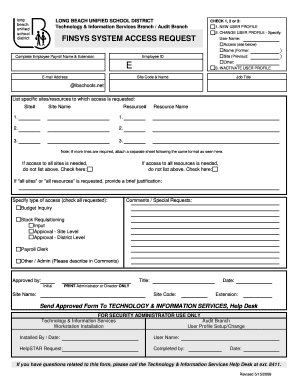
This guide provides detailed instructions on how to complete the Finsys System Access Request for the Long Beach Unified School District. Whether you are a new user or need to update your existing profile, follow these steps to ensure your request is submitted accurately.
Follow the steps to successfully fill out the access request form.
- Use the 'Get Form' button to access the online version of the Finsys System Access Request.
- Select the appropriate option by checking 1, 2, or 3 to indicate whether you are creating a new user profile, changing an existing user profile, or inactivating a user profile. If you are changing an existing profile, specify the details.
- Enter your user name in the designated field, followed by your complete employee payroll name and extension.
- Fill in your employee ID, site code, and name. Ensure the provided information is accurate to facilitate processing.
- In the 'E-mail Address' field, enter an email address associated with your profile, preferably your school email (@lbschools.net).
- List the specific sites/resources to which you are requesting access. Use the format provided to enter the site number, site name, resource number, and resource name. If additional lines are needed, attach a separate sheet with the same format.
- If you need access to all sites or all resources, indicate this by checking the respective boxes instead of listing them.
- Provide a brief justification if you are requesting access to all sites or resources to help clarify your needs.
- Specify the type of access required by checking all applicable boxes, including budget inquiry, stock requisitioning, input, approval levels, payroll clerk, or other administrative needs.
- Include any comments or special requests in the provided space to further clarify your needs.
- Obtain the necessary approvals by having the relevant administrator or director sign, including their title, site name, date, and site code.
- Once completed, send the approved form to the Technology & Information Services Help Desk for processing.
- If you have any questions regarding this form, contact the Technology & Information Services Help Desk at the specified extension.
Complete your Finsys System Access Request online today to ensure your access is granted efficiently.
Jill Baker - Superintendent of Schools - Long Beach Unified School District | LinkedIn.
Industry-leading security and compliance
US Legal Forms protects your data by complying with industry-specific security standards.
-
In businnes since 199725+ years providing professional legal documents.
-
Accredited businessGuarantees that a business meets BBB accreditation standards in the US and Canada.
-
Secured by BraintreeValidated Level 1 PCI DSS compliant payment gateway that accepts most major credit and debit card brands from across the globe.