Loading
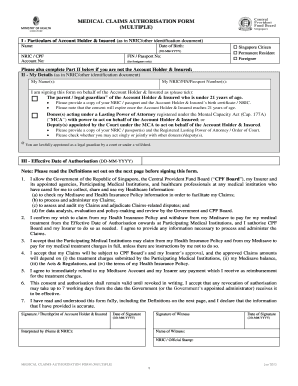
Get Medical Claims Authorisation Form
How it works
-

Open form follow the instructions
-

Easily sign the form with your finger
-

Send filled & signed form or save
How to fill out the Medical Claims Authorisation Form online
Filling out the Medical Claims Authorisation Form online can help streamline your healthcare claims process. This guide provides you with clear, step-by-step instructions to ensure that you complete the form correctly and efficiently.
Follow the steps to fill out the Medical Claims Authorisation Form online.
- Click ‘Get Form’ button to obtain the form and open it in your preferred editing tool.
- Enter the particulars of the account holder and insured in the designated fields. Ensure you input your name, date of birth, and identification number as stated in your NRIC or other identification document.
- Select your status by checking the appropriate box — Singapore Citizen, Permanent Resident, or Foreigner. If you are a foreigner, provide your passport number in the relevant field.
- If you are not the account holder or insured, complete Part II with your details. Include your name and identification number, and specify your role (e.g., parent, legal guardian, donee) by ticking the corresponding box.
- Attach the necessary documents as requested, including copies of identification and any relevant legal documents depending on your role.
- In Part III, indicate the effective date of authorisation in the specified field.
- Read the consent statements carefully and ensure you understand the implications of your authorisation. Confirm all details and sign the form where indicated; you may also need a witness to sign.
- Once you have filled out the entire form, review all entries for accuracy. Save changes and choose to download, print, or share the completed form as needed.
Complete your Medical Claims Authorisation Form online today for a smoother healthcare claims experience.
There is no need to visit a physical branch since this can be done online simply by logging in to my cpf Online Services using your SingPass details. From there, you will be able to see the balance you currently have in your MediSave Account (MA) as well as your Ordinary Account (OA) and Special Account (SA) under CPF.