Loading
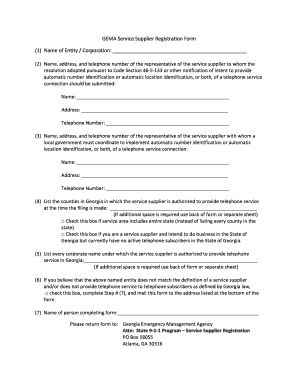
Get Gema Service Supplier Registration Form (1) Name Of Entity ... - Gema Ga
How it works
-

Open form follow the instructions
-

Easily sign the form with your finger
-

Send filled & signed form or save
How to fill out the GEMA Service Supplier Registration Form (1) Name of Entity ... - Gema Ga online
Filling out the GEMA Service Supplier Registration Form is a crucial step for service suppliers looking to provide telephone services in Georgia. This guide will help users understand each section of the form and provide step-by-step instructions to ensure a smooth filling process.
Follow the steps to successfully complete the GEMA Service Supplier Registration Form.
- Press the ‘Get Form’ button to access the registration form. This will allow you to open it in a digital format for completion.
- In the first section, provide the name of the entity or corporation applying for registration. Ensure that the name is accurate and matches your legal documents.
- Fill in the name, address, and telephone number of the representative of the service supplier. This person will receive notifications regarding services, so their information must be current and correct.
- In the next section, list the name, address, and telephone number of another representative with whom local governments will coordinate for automatic identification services. Include all relevant details.
- Indicate in which counties of Georgia your service supplier is authorized to provide telephone services. If your service area covers the entire state, check the corresponding box.
- List all corporate names under which your service supplier operates in Georgia. If you need more space, utilize the back of the form or attach additional sheets as required.
- If applicable, check the box if you believe that your entity does not fit the definition of a service supplier, and complete the subsequent steps for mailing your form to the appropriate address.
- Provide the name of the individual completing the form in the final field.
- Review the entire form for completeness and accuracy, then save your changes. You can download, print, or share the form as necessary.
Complete the GEMA Service Supplier Registration Form online today to ensure compliance with local regulations.
On your Android device, open the Phone app . Call recording. Under “Always record,” turn on Numbers not in your contacts. Tap Always record.
Industry-leading security and compliance
US Legal Forms protects your data by complying with industry-specific security standards.
-
In businnes since 199725+ years providing professional legal documents.
-
Accredited businessGuarantees that a business meets BBB accreditation standards in the US and Canada.
-
Secured by BraintreeValidated Level 1 PCI DSS compliant payment gateway that accepts most major credit and debit card brands from across the globe.