Loading
Form preview
  • US Legal Forms
  • Form Library
  • More Forms
  • More Uncategorized Forms
  • Compro Exam

Get Compro Exam

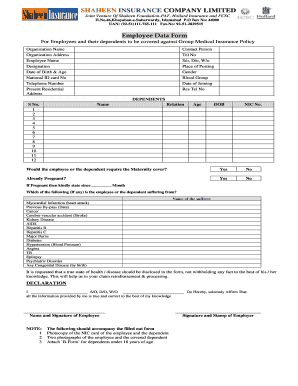
Employee Data Form For Employees and their dependents to be covered against Group Medical Insurance Policy Organization Name Organization Address Employee Name Designation Date of Birth & Age National ID card No Telephone Number Present Residential Address Contact Person Tel No S/o, D/o, W/o Place of Posting Gender Blood Group Date of Joining Res Tel No DEPENDENTS S No. 1 2 3 4 5 6 7 8 9 10 11 12 Name Relation Age DOB NIC No. Would the employee or the dependent require the Maternity co.

How it works

  1. Open form

    Open form follow the instructions

  2. Easily sign form

    Easily sign the form with your finger

  3. Share form

    Send filled & signed form or save

How to fill out the Compro Exam online

The Compro Exam is a crucial document for employees applying for group medical insurance coverage. This guide will provide you with step-by-step instructions on how to fill out the form accurately and efficiently.

Follow the steps to successfully complete the Compro Exam online.

  1. Press the ‘Get Form’ button to obtain the Compro Exam and open it in the designated editor.
  2. Fill in the organization name and address, ensuring accuracy to avoid delays in processing.
  3. Enter your personal information including employee name, designation, date of birth, age, and national ID card number. Double-check for correctness.
  4. Provide your telephone number and current residential address. Ensure that the contact information is up to date.
  5. Identify a contact person along with their telephone number for future communication.
  6. Indicate your relationship (S/o, D/o, W/o) and your place of posting.
  7. Select your gender and blood group from the provided options.
  8. Input your date of joining and residential telephone number.
  9. List your dependents according to the given format. For each dependent, include their name, relationship, age, date of birth, and NIC number.
  10. Answer whether you or any dependent requires maternity coverage and whether currently pregnant, providing details as necessary.
  11. Disclose any medical conditions the employee or dependents may suffer from, as listed in the form.
  12. Review all information entered for accuracy and completeness.
  13. Affirm the declaration by signing your name, indicating that the provided information is true to the best of your knowledge.
  14. Attach the required documents: photocopy of the NIC card, two photographs of the employee and any dependent, and B-Form for dependents under 18 years.
  15. Finalize and submit the form by saving changes, downloading a copy, printing it, or sharing it as necessary.

Complete your Compro Exam online today for efficient processing of your insurance coverage!

Get form

Experience a faster way to fill out and sign forms on the web. Access the most extensive library of templates available.
Get form

Related content

40246 Compro Approval - FDA
Bioequivalence has determined your Compro™ Suppositories. ( ... The physical exam...
Learn more
Compro Agreement Form: June 2020 - June 2021
This exam tests the material covered in the Fundamentals of Programming Practices course...
Learn more
User Manual - Graham-Field
examination by GF or its authorized representative, prove to be a warranty item....
Learn more

Related links form

Algebra 1 Unit 4 Test MLG 8.11 Isolation And Identification Of Listeria Monocytogenes From Red Meat, Poultry Practicum 2 And 3 Practicum Site Confirmation Form - Dts Sample Submission Form - Charles River Laboratories

Questions & Answers

Get answers to your most pressing questions about US Legal Forms API.

Contact support

The civil service exam is an exam that tests people applying for specific civil service jobs. The point of the test is to prove applicants have the appropriate skills and are eligibile for a specific position. The exam varies between different fields and levels of government.

To become a civil servant, you must meet the requirements of the position you are applying for and take an exam. For example, if you are a civil servant doctor, you will need to have a license to practice medicine. Also, to qualify as a civil servant for all positions you will be required to pass a background check.

The Civil Service is defined as "all appointive positions in the executive, judicial, and legislative branches of the Government of the United States, except positions in the uniformed services." (5 U.S.C. § 2101).

Almost every job within local, state, and federal government requires passing a civil service exam. Although there are many different positions available within civil service, most require some type of civil service exam.

So many applicants fail to get the job because they don't pass the Civil Service Exam. It is one of the most challenging examinations that require a lot of practice and preparation. Most applicants do not take this test too seriously, and we don't want you to make the same mistake.

Get This Form Now!

Use professional pre-built templates to fill in and sign documents online faster. Get access to thousands of forms.
Get form
If you believe that this page should be taken down, please follow our DMCA take down processhere.

Industry-leading security and compliance

US Legal Forms protects your data by complying with industry-specific security standards.
  • In businnes since 1997
    25+ years providing professional legal documents.
  • Accredited business
    Guarantees that a business meets BBB accreditation standards in the US and Canada.
  • Secured by Braintree
    Validated Level 1 PCI DSS compliant payment gateway that accepts most major credit and debit card brands from across the globe.
Get Compro Exam
Get form
  • Adoption
  • Bankruptcy
  • Contractors
  • Divorce
  • Home Sales
  • Employment
  • Identity Theft
  • Incorporation
  • Landlord Tenant
  • Living Trust
  • Name Change
  • Personal Planning
  • Small Business
  • Wills & Estates
  • Packages A-Z
  • Affidavits
  • Bankruptcy
  • Bill of Sale
  • Corporate - LLC
  • Divorce
  • Employment
  • Identity Theft
  • Internet Technology
  • Landlord Tenant
  • Living Wills
  • Name Change
  • Power of Attorney
  • Real Estate
  • Small Estates
  • Wills
  • All Forms
  • Forms A-Z
  • Form Library
  • Legal Hub
  • About Us
  • Help Portal
  • Legal Resources
  • Blog
  • Affiliates
  • Contact Us
  • Delete My Account
  • Site Map
  • Industries
  • Forms in Spanish
  • Localized Forms
  • State-specific Forms
  • Forms Kit
  • Real Estate Handbook
  • All Guides
  • Notarize
  • Incorporation services
  • For Consumers
  • For Small Business
  • For Attorneys
  • USLegal
  • FormsPass
  • pdfFiller
  • signNow
  • altaFlow
  • DocHub
  • Instapage
Form Packages
  • Adoption
  • Bankruptcy
  • Contractors
  • Divorce
  • Home Sales
  • Employment
  • Identity Theft
  • Incorporation
  • Landlord Tenant
  • Living Trust
  • Name Change
  • Personal Planning
  • Small Business
  • Wills & Estates
  • Packages A-Z
Form Categories
  • Affidavits
  • Bankruptcy
  • Bill of Sale
  • Corporate - LLC
  • Divorce
  • Employment
  • Identity Theft
  • Internet Technology
  • Landlord Tenant
  • Living Wills
  • Name Change
  • Power of Attorney
  • Real Estate
  • Small Estates
  • Wills
  • All Forms
  • Forms A-Z
  • Form Library
Customer Service
  • Legal Hub
  • About Us
  • Help Portal
  • Legal Resources
  • Blog
  • Affiliates
  • Contact Us
  • Delete My Account
  • Site Map
  • Industries
  • Forms in Spanish
  • Localized Forms
  • State-specific Forms
  • Forms Kit
Legal Guides
  • Real Estate Handbook
  • All Guides
Prepared for you
  • Notarize
  • Incorporation services
Our Customers
  • For Consumers
  • For Small Business
  • For Attorneys
Our Sites
  • USLegal
  • FormsPass
  • pdfFiller
  • signNow
  • altaFlow
  • DocHub
  • Instapage
Social Media
Call us now toll free:
+1 833 426 79 33
As seen in:
© Copyright 1999-2026 airSlate Legal Forms, Inc. 3720 Flowood Dr, Flowood, Mississippi 39232
  • Your Privacy Choices
  • Terms of Service
  • Privacy Notice
  • Content Takedown Policy
  • Bug Bounty Program