Loading
Get Application For A Canada Pension Plan Child''s Benefit Isp1400
How it works
-

Open form follow the instructions
-

Easily sign the form with your finger
-

Send filled & signed form or save
How to fill out the Application For A Canada Pension Plan Child's Benefit Isp1400 online
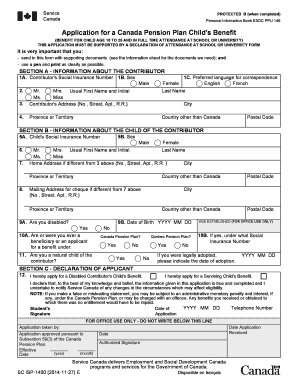
Filling out the Application For A Canada Pension Plan Child's Benefit Isp1400 is an essential step for families seeking financial support for children in specific circumstances. This guide provides a clear, step-by-step process to help you complete the application online efficiently and accurately.
Follow the steps to successfully fill out your application
- Click the ‘Get Form’ button to obtain the form and open it in your preferred editing tool.
- Begin with Section A, which requires information about the contributor. Enter the contributor's Social Insurance Number, select their sex, and provide their preferred language for correspondence. Follow up with their last name, first name, and address details including city, province, and postal code.
- In Section B, provide information regarding the child of the contributor. Enter the child's Social Insurance Number, their sex, and full name. If the child's home address differs from the contributor's, fill in that information as well.
- Still in Section B, specify the mailing address for the benefit cheque if it is different from the child's address. Ensure to answer the questions regarding any disabilities and if the child is a natural child of the contributor or was legally adopted.
- Move to Section C, the Declaration of Applicant. This section requires you to apply for the appropriate type of benefit. Carefully review your application details, ensuring all information is complete and true to the best of your knowledge.
- Complete the date field and provide a contact telephone number where you can be reached. Sign the application to confirm the information provided is accurate.
- After completing all sections, ensure to gather any required supporting documents. You can save your changes, download, or print the application form for submission.
- Finally, submit the application and supporting documents to your nearest Service Canada office as instructed in the information sheet.
Complete your documents online today to ensure timely processing of your application!
The qualified parent must complete a separate form (ISP 1640) when applying for a CPP benefit. If you are eligible for the CRDO and did not complete this form when you applied for your CPP benefit, it can be submitted later. It is fully retroactive.
Industry-leading security and compliance
US Legal Forms protects your data by complying with industry-specific security standards.
-
In businnes since 199725+ years providing professional legal documents.
-
Accredited businessGuarantees that a business meets BBB accreditation standards in the US and Canada.
-
Secured by BraintreeValidated Level 1 PCI DSS compliant payment gateway that accepts most major credit and debit card brands from across the globe.