Loading
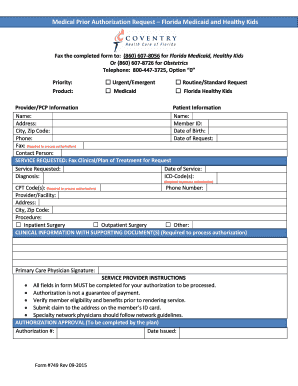
Get Coventry Medicaid Florida Form
How it works
-

Open form follow the instructions
-

Easily sign the form with your finger
-

Send filled & signed form or save
How to fill out the Coventry Medicaid Florida Form online
Filling out the Coventry Medicaid Florida Form online can seem daunting, but with clear guidance, you can navigate the process smoothly. This comprehensive guide will walk you through each section of the form, ensuring that you complete it accurately and efficiently.
Follow the steps to successfully complete the form online.
- Click ‘Get Form’ button to access the Coventry Medicaid Florida Form and open it in your selected editor.
- Begin with the priority section. Indicate whether your request is 'Urgent/Emergent' or 'Routine/Standard' by checking the appropriate box.
- Next, fill in the provider or primary care physician (PCP) information, including their name, address, and contact details.
- Then, provide the patient information. Enter the patient's name, member ID, address, city, zip code, date of birth, phone number, and the date of the request.
- In the service requested section, specify the service you are requesting. Be sure to include the date of service, diagnosis, and relevant ICD and CPT codes, as these are required for processing.
- Provide the contact information for the service provider or facility, including their name, address, and phone number. Additionally, indicate the type of procedure by selecting either 'Inpatient Surgery', 'Outpatient Surgery', or 'Other'.
- Attach any clinical information and supporting documents that are necessary for your request.
- Ensure that the primary care physician signs the form before submission, as this is required for processing authorization.
- Once all sections are completed and verified, save your changes. You may then download, print, or share the completed form as needed.
Take the next step and fill out your Coventry Medicaid Florida Form online today for a smoother authorization process.
Those on Medicaid can print a temporary Medicaid card from their MyACCESS Account. Further information on Medicaid services is available from the Agency for Health Care Administration.