Loading
Get Otc 904-a 2015 - Oklahoma - Ok
How it works
-

Open form follow the instructions
-

Easily sign the form with your finger
-

Send filled & signed form or save
How to fill out the OTC 904-A 2015 - Oklahoma - Ok online
The OTC 904-A form is essential for taxpayers in Oklahoma to report their tangible property for taxation purposes. This guide provides a step-by-step approach to filling out the form online, ensuring that users can complete the process accurately and efficiently.
Follow the steps to fill out the OTC 904-A form.
- Click ‘Get Form’ button to access the OTC 904-A form and open it in your editor.
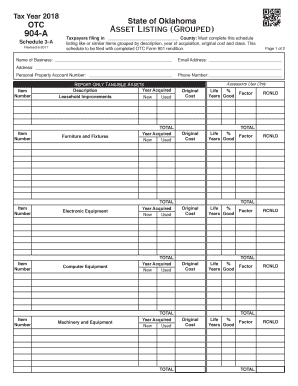
- Begin by entering the name of your business in the designated field at the top of the form. This is crucial for identifying your tax submissions correctly.
- Provide your email address and phone number. These fields are important for communications regarding your submission and any follow-up that may be necessary.
- Complete the address section. Include your full business address to ensure proper delivery of communications from the tax authority.
- Enter your personal property account number, if applicable. This helps in linking your form with your existing tax records.
- For each item being reported, fill in the description, year acquired, original cost, and indicate whether the item is new or used. This information will be grouped by the type of asset.
- Calculate and enter the life expectancy percentage and years of good use for each listed asset. This data is essential for proper asset valuation.
- After listing all assets and their respective values, review the total calculations for accuracy.
- Once satisfied with your entries, you can save changes, download, print, or share the completed form as needed or required.
Start filling out the OTC 904-A form online today for a seamless tax reporting experience.