Loading
Get Xxvoids
How it works
-

Open form follow the instructions
-

Easily sign the form with your finger
-

Send filled & signed form or save
How to fill out the Xxvoids online
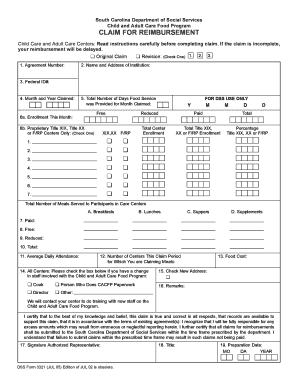
Filling out the Xxvoids form is a crucial step for submitting claims for reimbursement under the Child and Adult Care Food Program. This guide provides clear instructions to assist users in completing the document efficiently and accurately.
Follow the steps to fill out the Xxvoids form successfully.
- Click ‘Get Form’ button to access the Xxvoids form and open it in the editor.
- Indicate whether this is an original claim or a revision by checking the appropriate box. Choose from 'Original Claim', 'Revision 1', 'Revision 2', or 'Revision 3'.
- Enter your Agreement Number as stated in your approval letter. This identification number is essential for processing your claim.
- Provide the name and address of your institution. Ensure that all information is complete and accurate to avoid processing delays.
- Fill in your Federal ID number. This section is self-explanatory, but double-check for accuracy.
- Specify the month and year for which you are making the claim by entering the numbers in the designated fields.
- Indicate the total number of days food service was provided for the month claimed.
- Complete sections 6a and 6b: enter the enrollment figures, including individuals classified under free and reduced categories, ensuring all participants that attended at least one day during the month are included.
- Report the total number of meals served to participants by categorizing them into paid, free, and reduced sections as specified in the form.
- Enter the average daily attendance by counting the number of eligible participants in attendance for each participating center.
- Complete the section that indicates the number of centers for which you are claiming meals.
- Document the total food cost incurred for the month in question.
- If there have been changes in staff involved with the program, indicate this by checking the relevant boxes.
- Add any remarks or additional notes you wish to mention regarding this claim.
- Sign the claim by providing the signature of the authorized representative and include their title.
- Record the date of preparation for the claim form. This date should be after the last calendar day of the claim month.
- Once all sections are filled out, review the document for accuracy, save any changes, and prepare to submit the claim as instructed while keeping a copy for your records.
Complete your Xxvoids form online today to ensure your claims are processed efficiently.
A Tennessee deed form conveys interest in property from one party (the “grantor”) to another (the “grantee”). The documents can be prepared by anyone as long as the required information is written in the deed as outlined in § 66-5-103.