Loading
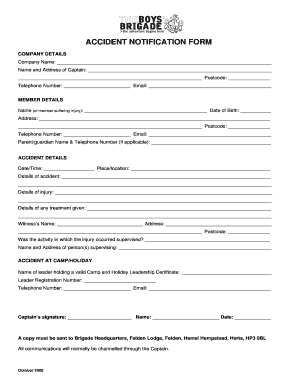
Get Accident Notification Form - Bbni Org
How it works
-

Open form follow the instructions
-

Easily sign the form with your finger
-

Send filled & signed form or save
How to fill out the ACCIDENT NOTIFICATION FORM - Bbni Org online
Filling out the Accident Notification Form for Bbni Org is a straightforward process that can be completed online. This guide provides clear, step-by-step instructions to help you complete the form accurately and efficiently.
Follow the steps to complete the form effectively.
- Click ‘Get Form’ button to obtain the form and open it in your preferred interface.
- Provide the company details by filling out the company name, the name and address of the captain, their postcode, telephone number, and email address. Ensure all information is accurate.
- In the member details section, enter the name of the person suffering the injury along with their date of birth, address, postcode, telephone number, and email address. If applicable, include the parent or guardian's name and telephone number.
- For the accident details, specify the date and time of the accident, followed by the place or location. Describe the details of the accident, the nature of the injury sustained, and any treatments administered.
- Include the witness's name and address, ensuring to provide their postcode as well. You will also need to indicate whether the activity during which the injury occurred was supervised and provide the name and address of the supervising person or people.
- If the accident occurred during a camp or holiday, state the name of the leader holding a valid Camp and Holiday Leadership Certificate along with their registration number, telephone number, and email address.
- Finally, the captain must sign the form, including their printed name and the date of signing.
- Once all sections are completed, save your changes, download, print, or share the form as needed. Ensure a copy is sent to Brigade Headquarters.
Complete documents online to ensure timely submissions.
In legal and financial documents that require a signature, there are terms called a “wet signature” and a “dry signature.” A wet signature is the original signature, so-called because it was once, albeit briefly, wet from the ink on the document. A dry signature is a copy or a faxed version of a wet signature.
Industry-leading security and compliance
US Legal Forms protects your data by complying with industry-specific security standards.
-
In businnes since 199725+ years providing professional legal documents.
-
Accredited businessGuarantees that a business meets BBB accreditation standards in the US and Canada.
-
Secured by BraintreeValidated Level 1 PCI DSS compliant payment gateway that accepts most major credit and debit card brands from across the globe.