Loading
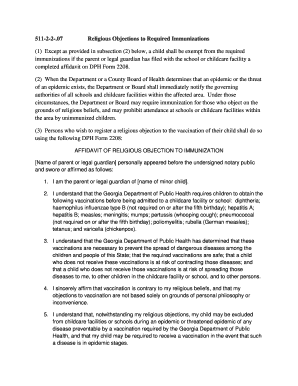
Get Religious Objections To Required Immunizations Form - Gachd
How it works
-

Open form follow the instructions
-

Easily sign the form with your finger
-

Send filled & signed form or save
How to fill out the Religious Objections To Required Immunizations Form - Gachd online
Filling out the Religious Objections To Required Immunizations Form - Gachd is an important process for parents or legal guardians who wish to register a religious objection to required vaccinations for their child. This guide provides clear and supportive steps to help you complete the form online.
Follow the steps to complete the form successfully.
- Click ‘Get Form’ button to access the Religious Objections To Required Immunizations Form - Gachd and open it for editing.
- Begin by entering the name of the parent or legal guardian at the designated section at the top of the form.
- Next, fill in the name of the minor child for whom the religious objection is being filed.
- Review the required vaccinations provided by the Georgia Department of Public Health. Confirm your understanding of the necessity of these vaccinations as outlined in the form.
- Carefully state your affirmation that vaccination is contrary to your religious beliefs in the section provided. Ensure that you clarify that your objections are not based solely on personal philosophy or inconvenience.
- Acknowledge the potential consequences by reading the section regarding the exclusion of your child during an epidemic or threatened epidemic.
- Sign and date the form where indicated to complete your affidavit.
- Find a notary public to swornly affirm your statements, and ensure the notary completes their portion of the form.
- Once the form is completed and notarized, save your changes, and consider downloading or printing the document for your records before submission.
Complete your Religious Objections To Required Immunizations Form - Gachd online today.
Parents may refuse required vaccinations only on religious grounds.